Struggling to Schedule Driving Lessons? Here's How Software Solves That
- Pedal Blog
- 27 FEB 2026
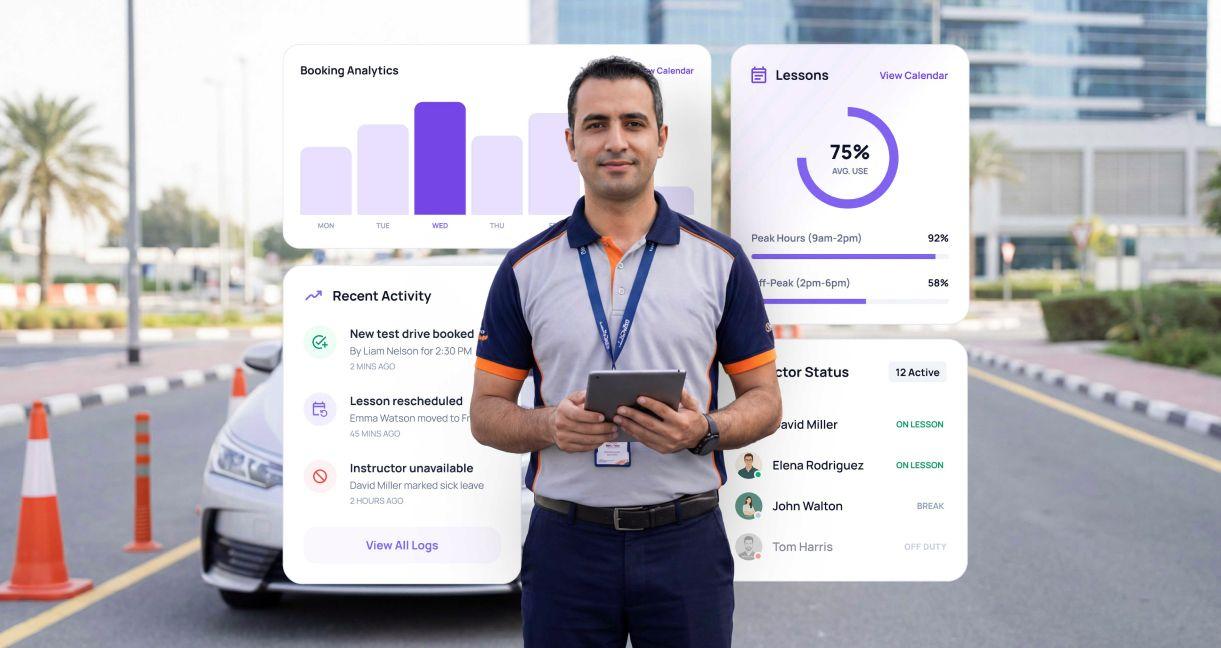
Scheduling driving lessons looks simple when viewed as a calendar problem. A learner chooses a time, an instructor is assigned, and the lesson is booked.
In practice, every lesson depends on several resources and operational conditions aligning at the same time. The learner must be eligible for the lesson, a suitable instructor must be available, the correct vehicle must be free, the lesson may need to take place at a specific branch or location, and internal scheduling rules must be satisfied.
As a driving school grows, coordinating these dependencies manually becomes increasingly difficult. A driving instructor booking system helps manage this complexity by treating scheduling as a resource-allocation process rather than simply displaying open calendar slots.
Why Driving Lesson Scheduling Gets Complicated Faster Than Expected
A driving school may manage hundreds or thousands of possible combinations between learners, instructors, vehicles, lesson categories, branches, and time slots.
The difficulty is not simply finding an empty hour.
Consider a learner who wants a highway training lesson at 10:00 AM. An instructor may technically be free at that time, but the booking could still be impossible because:
- the instructor is not authorized for that training category
- the appropriate vehicle is already allocated
- the learner has not completed a required earlier training stage
- the available vehicle is assigned to another branch
- the instructor does not have enough travel time between lessons
- the requested time conflicts with an internal operating rule
This means calendar availability and actual bookable capacity are not the same thing.
As lesson volumes increase, spreadsheets, phone calls, messaging apps, and separate calendars make these relationships harder to manage. A change to one resource can affect several bookings, which is why scheduling needs to be handled as an interconnected operational workflow.
Driving Lesson Scheduling Is Really a Resource Allocation Problem
A driving lesson is not simply an appointment between a learner and an instructor. It is a temporary allocation of multiple resources.
A valid lesson may depend on:
- learner eligibility
- instructor availability
- instructor qualifications
- vehicle availability
- vehicle category or transmission type
- lesson type
- learner training stage
- branch or pickup location
- operating hours
- travel time
- approved leave
- test commitments
- booking and cancellation rules
The scheduling process therefore needs to answer a more complex question than "Who is free?"It needs to determine:
Which combination of learner, instructor, vehicle, location, lesson type, and time satisfies all required conditions?
This distinction is important because an instructor's calendar can show availability while the driving school still has no usable capacity for a particular learner.
Example: Why a "Free" 10:00 AM Slot May Not Be Bookable
Suppose a learner requests an advanced road lesson at 10:00 AM.
Instructor A is available.
Vehicle B is also available.
At first glance, the lesson appears bookable. However, the scheduling system may determine that Instructor A is not assigned to advanced road training. Vehicle B may also belong to another branch, while the learner's training record shows that a prerequisite lesson has not yet been completed.
The 10:00 AM period is therefore technically available but not valid for that learner.
This is why effective scheduling requires constraint checking before a slot is shown or confirmed.
What Is a Driving Instructor Booking System?
A driving instructor booking system is a digital scheduling environment that coordinates learners, instructors, vehicles, lesson types, availability, and operating rules when creating or changing lesson bookings.
Unlike a generic calendar, it can evaluate whether a lesson is operationally possible before allowing the booking.
The objective is not simply to automate appointment entry. It is to maintain a reliable training calendar while accounting for the dependencies that determine whether each lesson can actually be delivered.
How Does a Driving Lesson Booking System Work?
A purpose-built scheduling workflow typically evaluates several conditions before confirming a lesson.
1. Learner Eligibility Is Checked
The system first identifies whether the learner is eligible for the requested lesson.
This may involve checking the learner's training stage, completed lessons, lesson package, required prerequisites, or other configured rules.
2. Instructor Availability Is Evaluated
The platform identifies instructors who are actually working during the requested period.
Approved leave, shift schedules, existing lessons, test duties, breaks, and other commitments need to be considered.
Availability alone may not be sufficient. The instructor may also need the appropriate authorization, specialization, language capability, or vehicle-category qualification.
3. Vehicle Availability Is Matched
A compatible training vehicle must be available during the same period.
The scheduling process may need to consider vehicle category, transmission type, branch allocation, maintenance blocks, existing reservations, and other operational restrictions.
4. Scheduling Rules Are Applied
The system evaluates configured rules such as minimum booking notice, lesson sequence, instructor breaks, branch restrictions, maximum lessons per shift, travel time, or cancellation policies.
5. Valid Lesson Slots Are Displayed
Only slots that satisfy the necessary conditions should be presented to the administrator or learner.
This prevents a technically empty calendar period from being mistaken for a genuinely bookable lesson.
6. The Booking Is Confirmed, and Resources Are Reserved
Once a valid slot is selected, the instructor, vehicle, and lesson period are reserved together.
The schedule is then updated so the same resources cannot be assigned elsewhere during that period.
A simplified workflow looks like this:
Student requests lesson
↓
Learner eligibility checked
↓
Instructor availability checked
↓
Compatible vehicle checked
↓
Branch and location conditions checked
↓
Scheduling rules applied
↓
Valid slots displayed
↓
Selected slot reserved
↓
Booking confirmed
↓
Relevant notifications triggered
↓
Lesson completed or scheduling exception handled
Availability vs Capacity: Why the Difference Matters
Availability describes whether an individual resource is free.
Capacity describes how many valid lessons the driving school can actually deliver after all required resources and constraints are considered.
For example, a school may have ten instructors technically available during a particular hour. If only six appropriate vehicles are available, practical lesson capacity may already be limited to six.
Capacity could fall further if some instructors cannot conduct the requested lesson category or if several vehicles are located at another branch.
This distinction helps managers avoid assuming that unused instructor time automatically represents sellable lesson inventory.
Better capacity visibility also makes it easier to identify the real bottleneck. Depending on the period, the constraint could be instructor availability, vehicles, lesson-category capability, branch demand, or another operational factor.
Hard Constraints vs Student Preferences
An effective scheduling model separates conditions that must be satisfied from conditions that are simply desirable.
Hard Constraints
Hard constraints determine whether a booking is valid.
Examples include:
- instructor must be available
- compatible vehicle must be available
- learner must be eligible for the lesson stage
- instructor must have the required authorization
- lesson must fall within operating hours
If any required condition fails, the slot should normally not be offered.
Soft Preferences
Soft preferences improve convenience but can sometimes be relaxed.
These may include:
- preferred instructor
- preferred lesson time
- preferred branch
- preferred language
- preferred training vehicle
Separating the two prevents a preference from unnecessarily blocking otherwise valid capacity.
For example, if a learner's preferred instructor is unavailable, the system could display another qualified instructor rather than treating the entire period as unavailable.
How Booking Software Prevents Scheduling Conflicts
Scheduling conflicts occur when the same limited resource is allocated to incompatible activities.
A common example is assigning one instructor to two learners at the same time. Vehicle conflicts can occur in the same way.
Rule-based scheduling reduces these conflicts by checking existing reservations before confirming a booking.
The process can also evaluate dependencies beyond time overlap. An instructor might technically have two adjacent lessons available but be unable to travel between their locations within the available gap.
When bookings, leave records, vehicles, and lesson requirements are maintained within one scheduling environment, changes can be evaluated against the current schedule rather than against separate spreadsheets or outdated calendars.
Why Empty Gaps Appear in Instructor Schedules
Driving schools can have available instructor hours without being able to use those hours efficiently.
Consider an instructor working from 8:00 AM to 4:00 PM with lessons scheduled at:
- 8:00 AM
- 9:00 AM
- 11:00 AM
- 2:00 PM
- 3:00 PM
Although several periods remain technically open, the instructor's schedule is fragmented.
Some gaps may be usable, while others may be difficult to fill because of lesson duration, travel requirements, learner demand, break rules, or vehicle availability.
This is known as scheduling fragmentation.
A scheduling platform can help administrators see where fragmented capacity exists and, where operational rules allow, prioritize booking patterns that create more practical blocks of instructional time.
The purpose is not to eliminate every gap. Some idle periods will always occur. The objective is to understand whether available capacity is being converted into usable lesson slots.
How Software Helps Improve Instructor and Vehicle Utilization
Instructor utilization and vehicle utilization are connected.
Adding another lesson to an instructor's calendar creates little value if no appropriate training vehicle is available. Similarly, a vehicle may remain idle because qualified instructors are already fully allocated.
A centralized scheduling view allows management to examine both resources together.
For example, if learner demand is high between 5:00 PM and 7:00 PM but suitable instructors or vehicles are consistently unavailable, the school can identify the resource creating the capacity constraint.
This provides a stronger basis for staffing, shift planning, vehicle allocation, and branch-level capacity decisions.
What Happens When a Student Cancels a Lesson?
A cancellation does more than remove an appointment. It creates a temporary capacity opportunity.
If the cancelled slot remains empty, instructor and vehicle time may go unused.
- A structured cancellation workflow can:
- release the instructor and vehicle reservation
- return the lesson period to available capacity
- identify learners eligible for that slot
- make the slot available for rebooking
- apply waitlist or replacement rules where configured
- notify relevant learners
- update the final schedule
Driving schools can measure how effectively they refill these openings using a management metric such as Cancellation Recovery Rate:
Cancellation Recovery Rate = Rebooked Cancelled Slots ÷ Total Cancelled Slots × 100
This is a useful internal management KPI rather than an industry-standard benchmark. Each driving school should evaluate the metric against its own historical performance, demand levels, and operating model.
How Self-Service Booking Should Actually Work
Online booking should not mean giving learners access to every empty period on the calendar.
A well-designed self-service booking process should expose only slots that the learner is actually eligible to book.
Before displaying availability, driving school booking software may need to verify:
- current training stage
- lesson prerequisites
- qualified instructor availability
- compatible vehicle availability
- branch restrictions
- package or lesson balance
- booking notice requirements
- other configured operating rules
The learner then chooses from valid options rather than creating a booking that administrators need to correct later.
Self-service scheduling is therefore most effective when the same operational rules used by administrators also control what learners can see.
What Scheduling KPIs Should Driving Schools Track?
Scheduling performance should be measured using operational indicators rather than relying only on the number of lessons booked.
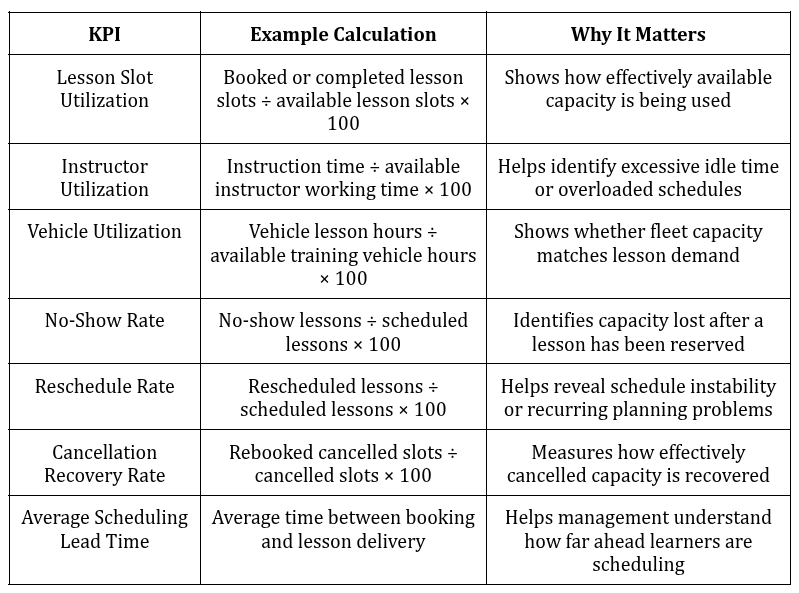
There is no universal percentage that automatically defines good performance for every driving school. Metrics should be interpreted based on operating hours, lesson duration, market demand, fleet size, training model, and branch structure.
Manual Scheduling vs Rule-Based Scheduling
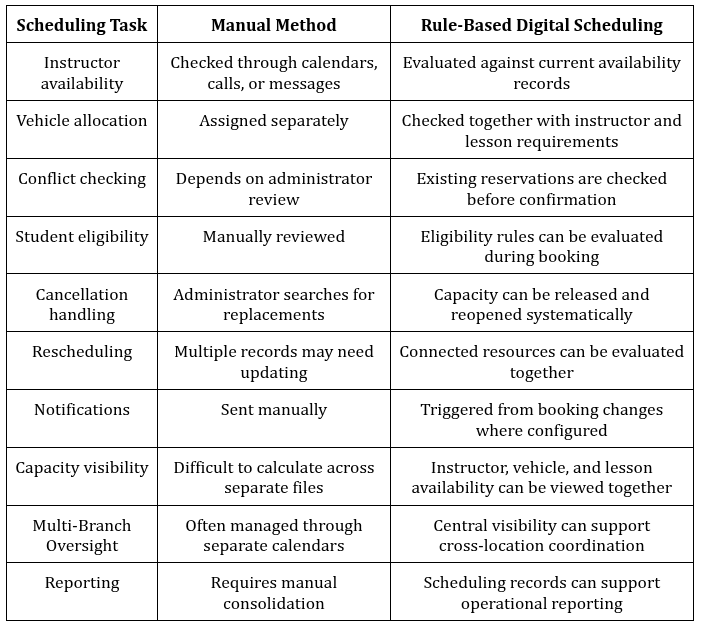
The main difference is consistency. Manual scheduling requires administrators to repeatedly remember and evaluate the same rules. Rule-based scheduling applies defined conditions each time a booking is created or changed.
How Scheduling Software Reduces Administrative Work
Scheduling administration involves far more than entering appointments.
Teams may spend time confirming instructor availability, finding replacement vehicles, checking learner eligibility, processing leave, handling cancellations, changing appointments, and communicating updates.
The greatest administrative benefit of a structured scheduling platform comes from reducing repeated decision-making.
For example, instead of an administrator manually checking whether a learner can book a particular lesson, eligibility rules can be evaluated during the scheduling process.
Instead of separately checking an instructor calendar and vehicle sheet, both resources can be assessed before the slot is offered.
Staff remain important for exceptions, unusual learner requirements, and operational decisions, but routine scheduling becomes easier to manage consistently.
Can Lesson Scheduling Software Support Compliance?
Scheduling systems can support operational record keeping where driving schools are required to maintain information about training activities.
Depending on the jurisdiction and the organization's requirements, relevant records may include lesson attendance, instructor assignments, training progression, vehicle usage, or completed training hours.
Software should not be assumed to provide regulatory compliance automatically. Requirements vary between markets.
Its practical role is to maintain structured operational records that can make it easier for authorized teams to retrieve, review, and report relevant information when required.
How Scheduling Changes for Multi-Branch Driving Schools
Multi-branch operations introduce another layer of dependencies.
An instructor may work at more than one location. Vehicles may belong to specific branches. Learners may be registered at one location but require training elsewhere. Demand patterns may also differ substantially between branches.
Effective multi-branch scheduling therefore requires both centralized visibility and local operational control.
Central visibility allows management to understand capacity, utilization, and scheduling pressure across the organization.
Local control allows each branch to manage practical requirements such as instructor shifts, vehicle availability, operating hours, and learner demand.
The two should work together rather than forcing every scheduling decision into a single centralized process.
What Features Matter Most in Driving School Booking Software?
When evaluating scheduling technology, focus on capabilities that directly support the lesson-allocation process.
Important areas include:
- real-time instructor availability
- simultaneous instructor and vehicle allocation
- learner eligibility checks
- configurable scheduling rules
- conflict detection
- lesson-stage requirements
- cancellation and rescheduling workflows
- valid-slot filtering for self-service booking
- centralized schedule visibility
- multi-branch scheduling controls
- utilization and capacity reporting
The evaluation should start with the school's actual scheduling constraints rather than a generic software feature checklist.
A useful question is:
Can the system determine whether a lesson is operationally valid before the learner or administrator confirms it?
How to Evaluate the ROI of Better Lesson Scheduling
The return from improved scheduling should be evaluated through measurable operational changes rather than assumptions about guaranteed savings.
Useful inputs include:
Recovered cancelled lessons:
How many cancelled slots are successfully rebooked?
Instructor utilization:
Is more available instructor time being converted into delivered lessons?
Vehicle utilization:
Are training vehicles being allocated more effectively against demand?
Schedule fragmentation:
Are excessive gaps decreasing without creating impractical workloads?
Administrative scheduling time:
How much staff time is spent handling routine bookings, changes, and conflicts?
No-show capacity loss:
How much scheduled capacity is lost because learners do not attend?
Available lesson capacity:
Can the school deliver more valid lessons with its existing instructor and vehicle resources?
Management can compare these measures before and after changes to its scheduling process to determine whether operational performance has improved.
How Pedal Mobility Supports Smarter Driving Lesson Scheduling
Pedal Mobility provides a centralized driving centre management environment designed to help driving schools coordinate operational workflows.
Bringing scheduling-related information into a connected environment can help teams work with a clearer view of learner records, instructor availability, training progression, vehicle allocation, lesson bookings, and broader operational activity.
The value of this approach is particularly important when a booking depends on multiple resources.
Instead of treating instructor calendars, learner information, and operational schedules as separate activities, driving schools can manage them as connected parts of the training process.
This supports a more structured approach to lesson allocation and gives management stronger visibility into how available resources are being used.
Key Takeaways
Driving lesson scheduling is fundamentally a constrained resource-allocation problem.
A bookable lesson requires more than an open instructor calendar. Learner eligibility, instructor capability, vehicle availability, lesson category, location, operating rules, and timing may all need to align.
Driving schools can improve scheduling by distinguishing availability from usable capacity, separating hard constraints from preferences, managing cancellations as recoverable capacity, reducing unnecessary schedule fragmentation, and tracking operational KPIs.
Rule-based scheduling technology helps apply these conditions consistently whenever lessons are booked, changed, cancelled, or reassigned.
Conclusion
Efficient lesson scheduling depends on coordinating the complete training environment, not simply placing appointments into a calendar.
As learner volumes, instructors, vehicles, and branches increase, the number of scheduling dependencies increases with them. A purpose-built system can help driving schools evaluate these dependencies before a lesson is confirmed, maintain clearer capacity visibility, recover cancelled slots, and manage changes with greater consistency.
For driving schools looking to strengthen scheduling and broader operational control, explore Pedal Mobility's driving-centre management capabilities or request a walkthrough to see how a centralized platform can support your training operations.
FAQs
Q: What Is a Driving Instructor Booking System?
A: A driving instructor booking system manages lesson scheduling by coordinating learner requirements with instructor availability, vehicle availability, lesson type, training stage, location, and scheduling rules. Unlike a basic calendar, it can determine whether a lesson is operationally valid before confirming the booking.
Q: How Does Driving School Software Prevent Double Bookings?
A: Scheduling software checks existing instructor, vehicle, and lesson reservations before confirming a new booking. If a required resource is already allocated during that period, the conflicting slot can be excluded from the available options.
Q: Can Students Choose Their Own Instructor?
A: A driving school can allow instructor preferences where its scheduling rules permit. However, the preferred instructor still needs to satisfy required conditions such as availability, qualification, lesson category, location, and other operational constraints.
Q: How Does Software Handle Instructor Leave?
A: Approved instructor leave can be reflected in the scheduling calendar so affected periods are no longer offered for new bookings. Existing lessons during the unavailable period can then be identified for reassignment or rescheduling according to the school's workflow.
Q: What Happens When a Student Cancels a Driving Lesson?
A: The cancelled instructor and vehicle capacity can be released back into the schedule. The slot may then be offered to another eligible learner, reopened for booking, or processed through a waitlist workflow where available.
Q: Can Booking Software Manage Vehicles as Well as Instructors?
A: Purpose-built driving school scheduling systems can coordinate vehicle availability alongside instructor availability. This is important because a lesson may require a specific vehicle category, transmission type, branch allocation, or other operational condition before it can be confirmed.
Q: Can Lesson Scheduling Be Managed Across Multiple Branches?
A: Yes. Multi-branch scheduling can provide centralized visibility while maintaining branch-level controls for instructors, vehicles, operating hours, and local learner demand. This helps organizations understand capacity across locations without removing necessary local scheduling control.
You might also be interested

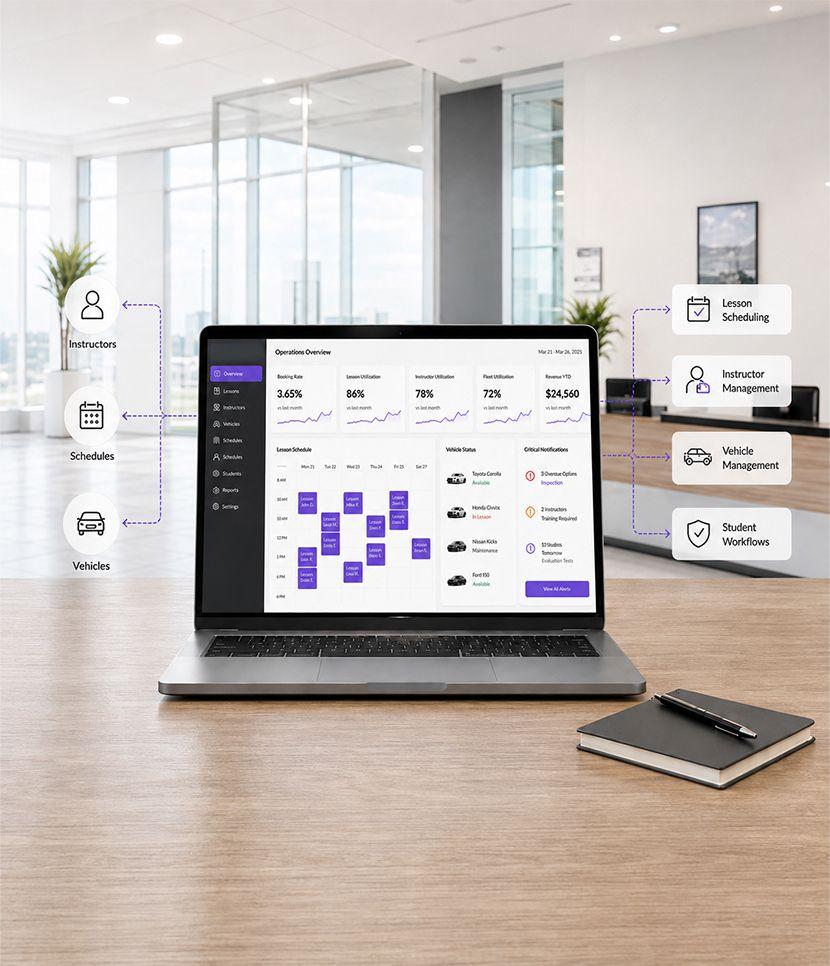
Transforming global driver training and licensing with AI-powered driver training software by connecting students, instructors, driving centres, and regulators in a seamless ecosystem.
Empowering all Stakeholders with Pedal Mobilitys Solutions.
Driving the Future With Results That Matter
Empowering students worldwide with innovative driver training software solutions tailored for modern learning.
Maximizing efficiency by smartly assigning vehicles and instructors, driven by our centralized driving school system.
Going fully digital with a paperless, user-friendly onboarding system powered by modern driving software.
Engaging students, instructors, and training admins every day through a connected, seamless, and intuitive driver training platform.
Introducing the New Era of AI in Personal Mobility
Pedal transforms driver education by integrating AI and automation into every step. Our centralized driving training software connects students, instructors, and regulators in a seamless, data-driven ecosystem built for modern mobility.
Insights and Stories shaping Driver Education
Maximizing efficiency by smartly assigning vehicles and instructors, driven by our centralized driving school system.
Going fully digital with a paperless, user-friendly onboarding system powered by modern driving software.
Engaging students, instructors, and training admins every day through a connected, seamless, and intuitive driver training platform.
Introducing the New Era of AI in Personal Mobility
Pedal transforms driver education by integrating AI and automation into every step. Our centralized driving training software connects students, instructors, and regulators in a seamless, data-driven ecosystem built for modern mobility.
Insights and Stories shaping Driver Education
Maximizing efficiency by smartly assigning vehicles and instructors, driven by our centralized driving school system.
Going fully digital with a paperless, user-friendly onboarding system powered by modern driving software.
Engaging students, instructors, and training admins every day through a connected, seamless, and intuitive driver training platform.
Introducing the New Era of AI in Personal Mobility
Pedal transforms driver education by integrating AI and automation into every step. Our centralized driving training software connects students, instructors, and regulators in a seamless, data-driven ecosystem built for modern mobility.
Insights and Stories shaping Driver Education
Maximizing efficiency by smartly assigning vehicles and instructors, driven by our centralized driving school system.
Going fully digital with a paperless, user-friendly onboarding system powered by modern driving software.
Engaging students, instructors, and training admins every day through a connected, seamless, and intuitive driver training platform.
Introducing the New Era of AI in Personal Mobility
Pedal transforms driver education by integrating AI and automation into every step. Our centralized driving training software connects students, instructors, and regulators in a seamless, data-driven ecosystem built for modern mobility.
Insights and Stories shaping Driver Education
Maximizing efficiency by smartly assigning vehicles and instructors, driven by our centralized driving school system.
Going fully digital with a paperless, user-friendly onboarding system powered by modern driving software.
Engaging students, instructors, and training admins every day through a connected, seamless, and intuitive driver training platform.
Introducing the New Era of AI in Personal Mobility
Pedal transforms driver education by integrating AI and automation into every step. Our centralized driving training software connects students, instructors, and regulators in a seamless, data-driven ecosystem built for modern mobility.
Insights and Stories shaping Driver Education
From instructor management to vehicle assignment, we are driving the future with results that matter.
Our platform connects students, instructors, and training admins every day through a connected, seamless, and intuitive driver training platform.
Introducing the New Era of AI in Personal Mobility
Transforming global driver training and licensing with AI-powered driver training software by connecting students, instructors, driving centres, and regulators in a seamless ecosystem.
Empowering all Stakeholders with Pedal Mobilitys Solutions.
Driving the Future With Results That Matter
Empowering students worldwide with innovative driver training software solutions tailored for modern learning.
Maximizing efficiency by smartly assigning vehicles and instructors, driven by our centralized driving school system.
Going fully digital with a paperless, user-friendly onboarding system powered by modern driving software.
Engaging students, instructors, and training admins every day through a connected, seamless, and intuitive driver training platform.
Introducing the New Era of AI in Personal Mobility
Pedal transforms driver education by integrating AI and automation into every step. Our centralized driving training software connects students, instructors, and regulators in a seamless, data-driven ecosystem built for modern mobility.
Insights and Stories shaping Driver Education
Maximizing efficiency by smartly assigning vehicles and instructors, driven by our centralized driving school system.
Going fully digital with a paperless, user-friendly onboarding system powered by modern driving software.
Engaging students, instructors, and training admins every day through a connected, seamless, and intuitive driver training platform.
Introducing the New Era of AI in Personal Mobility
Pedal transforms driver education by integrating AI and automation into every step. Our centralized driving training software connects students, instructors, and regulators in a seamless, data-driven ecosystem built for modern mobility.
Insights and Stories shaping Driver Education
Maximizing efficiency by smartly assigning vehicles and instructors, driven by our centralized driving school system.
Going fully digital with a paperless, user-friendly onboarding system powered by modern driving software.
Engaging students, instructors, and training admins every day through a connected, seamless, and intuitive driver training platform.
Introducing the New Era of AI in Personal Mobility
Pedal transforms driver education by integrating AI and automation into every step. Our centralized driving training software connects students, instructors, and regulators in a seamless, data-driven ecosystem built for modern mobility.
Insights and Stories shaping Driver Education
Maximizing efficiency by smartly assigning vehicles and instructors, driven by our centralized driving school system.
Going fully digital with a paperless, user-friendly onboarding system powered by modern driving software.
Engaging students, instructors, and training admins every day through a connected, seamless, and intuitive driver training platform.
Introducing the New Era of AI in Personal Mobility
Pedal transforms driver education by integrating AI and automation into every step. Our centralized driving training software connects students, instructors, and regulators in a seamless, data-driven ecosystem built for modern mobility.
Insights and Stories shaping Driver Education
Maximizing efficiency by smartly assigning vehicles and instructors, driven by our centralized driving school system.
Going fully digital with a paperless, user-friendly onboarding system powered by modern driving software.
Engaging students, instructors, and training admins every day through a connected, seamless, and intuitive driver training platform.
Introducing the New Era of AI in Personal Mobility
Pedal transforms driver education by integrating AI and automation into every step. Our centralized driving training software connects students, instructors, and regulators in a seamless, data-driven ecosystem built for modern mobility.
Insights and Stories shaping Driver Education
From instructor management to vehicle assignment, we are driving the future with results that matter.
Our platform connects students, instructors, and training admins every day through a connected, seamless, and intuitive driver training platform.
Introducing the New Era of AI in Personal Mobility Transforming global driver training and licensing with AI-powered driver training software by connecting students, instructors, driving centres, and regulators in a seamless ecosystem.
Empowering all Stakeholders with Pedal Mobilitys Solutions.
Driving the Future With Results That Matter
Empowering students worldwide with innovative driver training software solutions tailored for modern learning.
Maximizing efficiency by smartly assigning vehicles and instructors, driven by our centralized driving school system.
Going fully digital with a paperless, user-friendly onboarding system powered by modern driving software.
Engaging students, instructors, and training admins every day through a connected, seamless, and intuitive driver training platform.
Introducing the New Era of AI in Personal Mobility
Pedal transforms driver education by integrating AI and automation into every step. Our centralized driving training software connects students, instructors, and regulators in a seamless, data-driven ecosystem built for modern mobility.
Insights and Stories shaping Driver Education
Maximizing efficiency by smartly assigning vehicles and instructors, driven by our centralized driving school system.
Going fully digital with a paperless, user-friendly onboarding system powered by modern driving software.
Engaging students, instructors, and training admins every day through a connected, seamless, and intuitive driver training platform.
Introducing the New Era of AI in Personal Mobility
Pedal transforms driver education by integrating AI and automation into every step. Our centralized driving training software connects students, instructors, and regulators in a seamless, data-driven ecosystem built for modern mobility.
Insights and Stories shaping Driver Education
Maximizing efficiency by smartly assigning vehicles and instructors, driven by our centralized driving school system.
Going fully digital with a paperless, user-friendly onboarding system powered by modern driving software.
Engaging students, instructors, and training admins every day through a connected, seamless, and intuitive driver training platform.
Introducing the New Era of AI in Personal Mobility
Pedal transforms driver education by integrating AI and automation into every step. Our centralized driving training software connects students, instructors, and regulators in a seamless, data-driven ecosystem built for modern mobility.
Insights and Stories shaping Driver Education
Maximizing efficiency by smartly assigning vehicles and instructors, driven by our centralized driving school system.
Going fully digital with a paperless, user-friendly onboarding system powered by modern driving software.
Engaging students, instructors, and training admins every day through a connected, seamless, and intuitive driver training platform.
Introducing the New Era of AI in Personal Mobility
Pedal transforms driver education by integrating AI and automation into every step. Our centralized driving training software connects students, instructors, and regulators in a seamless, data-driven ecosystem built for modern mobility.
Insights and Stories shaping Driver Education
Maximizing efficiency by smartly assigning vehicles and instructors, driven by our centralized driving school system.
Going fully digital with a paperless, user-friendly onboarding system powered by modern driving software.
Engaging students, instructors, and training admins every day through a connected, seamless, and intuitive driver training platform.
Introducing the New Era of AI in Personal Mobility
Pedal transforms driver education by integrating AI and automation into every step. Our centralized driving training software connects students, instructors, and regulators in a seamless, data-driven ecosystem built for modern mobility.
Insights and Stories shaping Driver Education
From instructor management to vehicle assignment, we are driving the future with results that matter.
Our platform connects students, instructors, and training admins every day through a connected, seamless, and intuitive driver training platform.
Introducing the New Era of AI in Personal Mobility Transforming global driver training and licensing with AI-powered driver training software by connecting students, instructors, driving centres, and regulators in a seamless ecosystem.
Empowering all Stakeholders with Pedal Mobilitys Solutions.
Driving the Future With Results That Matter
Empowering students worldwide with innovative driver training software solutions tailored for modern learning.
Maximizing efficiency by smartly assigning vehicles and instructors, driven by our centralized driving school system.
Going fully digital with a paperless, user-friendly onboarding system powered by modern driving software.
Engaging students, instructors, and training admins every day through a connected, seamless, and intuitive driver training platform.
Introducing the New Era of AI in Personal Mobility
Pedal transforms driver education by integrating AI and automation into every step. Our centralized driving training software connects students, instructors, and regulators in a seamless, data-driven ecosystem built for modern mobility.
Insights and Stories shaping Driver Education
Maximizing efficiency by smartly assigning vehicles and instructors, driven by our centralized driving school system.
Going fully digital with a paperless, user-friendly onboarding system powered by modern driving software.
Engaging students, instructors, and training admins every day through a connected, seamless, and intuitive driver training platform.
Introducing the New Era of AI in Personal Mobility
Pedal transforms driver education by integrating AI and automation into every step. Our centralized driving training software connects students, instructors, and regulators in a seamless, data-driven ecosystem built for modern mobility.
Insights and Stories shaping Driver Education
Maximizing efficiency by smartly assigning vehicles and instructors, driven by our centralized driving school system.
Going fully digital with a paperless, user-friendly onboarding system powered by modern driving software.
Engaging students, instructors, and training admins every day through a connected, seamless, and intuitive driver training platform.
Introducing the New Era of AI in Personal Mobility
Pedal transforms driver education by integrating AI and automation into every step. Our centralized driving training software connects students, instructors, and regulators in a seamless, data-driven ecosystem built for modern mobility.
Insights and Stories shaping Driver Education
Maximizing efficiency by smartly assigning vehicles and instructors, driven by our centralized driving school system.
Going fully digital with a paperless, user-friendly onboarding system powered by modern driving software.
Engaging students, instructors, and training admins every day through a connected, seamless, and intuitive driver training platform.
Introducing the New Era of AI in Personal Mobility
Pedal transforms driver education by integrating AI and automation into every step. Our centralized driving training software connects students, instructors, and regulators in a seamless, data-driven ecosystem built for modern mobility.
Insights and Stories shaping Driver Education
Maximizing efficiency by smartly assigning vehicles and instructors, driven by our centralized driving school system.
Going fully digital with a paperless, user-friendly onboarding system powered by modern driving software.
Engaging students, instructors, and training admins every day through a connected, seamless, and intuitive driver training platform.
Introducing the New Era of AI in Personal Mobility
Pedal transforms driver education by integrating AI and automation into every step. Our centralized driving training software connects students, instructors, and regulators in a seamless, data-driven ecosystem built for modern mobility.
Insights and Stories shaping Driver Education
From instructor management to vehicle assignment, we are driving the future with results that matter.
Our platform connects students, instructors, and training admins every day through a connected, seamless, and intuitive driver training platform.
Introducing the New Era of AI in Personal Mobility Transforming global driver training and licensing with AI-powered driver training software by connecting students, instructors, driving centres, and regulators in a seamless ecosystem.
Empowering all Stakeholders with Pedal Mobilitys Solutions.
Driving the Future With Results That Matter
Empowering students worldwide with innovative driver training software solutions tailored for modern learning.
Maximizing efficiency by smartly assigning vehicles and instructors, driven by our centralized driving school system.
Going fully digital with a paperless, user-friendly onboarding system powered by modern driving software.
Engaging students, instructors, and training admins every day through a connected, seamless, and intuitive driver training platform.
Introducing the New Era of AI in Personal Mobility
Pedal transforms driver education by integrating AI and automation into every step. Our centralized driving training software connects students, instructors, and regulators in a seamless, data-driven ecosystem built for modern mobility.
Insights and Stories shaping Driver Education
Maximizing efficiency by smartly assigning vehicles and instructors, driven by our centralized driving school system.
Going fully digital with a paperless, user-friendly onboarding system powered by modern driving software.
Engaging students, instructors, and training admins every day through a connected, seamless, and intuitive driver training platform.
Introducing the New Era of AI in Personal Mobility
Pedal transforms driver education by integrating AI and automation into every step. Our centralized driving training software connects students, instructors, and regulators in a seamless, data-driven ecosystem built for modern mobility.
Insights and Stories shaping Driver Education
Maximizing efficiency by smartly assigning vehicles and instructors, driven by our centralized driving school system.
Going fully digital with a paperless, user-friendly onboarding system powered by modern driving software.
Engaging students, instructors, and training admins every day through a connected, seamless, and intuitive driver training platform.
Introducing the New Era of AI in Personal Mobility
Pedal transforms driver education by integrating AI and automation into every step. Our centralized driving training software connects students, instructors, and regulators in a seamless, data-driven ecosystem built for modern mobility.
Insights and Stories shaping Driver Education
Maximizing efficiency by smartly assigning vehicles and instructors, driven by our centralized driving school system.
Going fully digital with a paperless, user-friendly onboarding system powered by modern driving software.
Engaging students, instructors, and training admins every day through a connected, seamless, and intuitive driver training platform.
Introducing the New Era of AI in Personal Mobility
Pedal transforms driver education by integrating AI and automation into every step. Our centralized driving training software connects students, instructors, and regulators in a seamless, data-driven ecosystem built for modern mobility.
Insights and Stories shaping Driver Education
Maximizing efficiency by smartly assigning vehicles and instructors, driven by our centralized driving school system.
Going fully digital with a paperless, user-friendly onboarding system powered by modern driving software.
Engaging students, instructors, and training admins every day through a connected, seamless, and intuitive driver training platform.
Introducing the New Era of AI in Personal Mobility
Pedal transforms driver education by integrating AI and automation into every step. Our centralized driving training software connects students, instructors, and regulators in a seamless, data-driven ecosystem built for modern mobility.
Insights and Stories shaping Driver Education
From instructor management to vehicle assignment, we are driving the future with results that matter.
Our platform connects students, instructors, and training admins every day through a connected, seamless, and intuitive driver training platform.
Introducing the New Era of AI in Personal Mobility
Transforming global driver training and licensing with AI-powered driver training software by connecting students, instructors, driving centres, and regulators in a seamless ecosystem.
Empowering all Stakeholders with Pedal Mobilitys Solutions.
Driving the Future With Results That Matter
Empowering students worldwide with innovative driver training software solutions tailored for modern learning.
Maximizing efficiency by smartly assigning vehicles and instructors, driven by our centralized driving school system.
Going fully digital with a paperless, user-friendly onboarding system powered by modern driving software.
Engaging students, instructors, and training admins every day through a connected, seamless, and intuitive driver training platform.
Introducing the New Era of AI in Personal Mobility
Pedal transforms driver education by integrating AI and automation into every step. Our centralized driving training software connects students, instructors, and regulators in a seamless, data-driven ecosystem built for modern mobility.
Insights and Stories shaping Driver Education
Maximizing efficiency by smartly assigning vehicles and instructors, driven by our centralized driving school system.
Going fully digital with a paperless, user-friendly onboarding system powered by modern driving software.
Engaging students, instructors, and training admins every day through a connected, seamless, and intuitive driver training platform.
Introducing the New Era of AI in Personal Mobility
Pedal transforms driver education by integrating AI and automation into every step. Our centralized driving training software connects students, instructors, and regulators in a seamless, data-driven ecosystem built for modern mobility.
Insights and Stories shaping Driver Education
Maximizing efficiency by smartly assigning vehicles and instructors, driven by our centralized driving school system.
Going fully digital with a paperless, user-friendly onboarding system powered by modern driving software.
Engaging students, instructors, and training admins every day through a connected, seamless, and intuitive driver training platform.
Introducing the New Era of AI in Personal Mobility
Pedal transforms driver education by integrating AI and automation into every step. Our centralized driving training software connects students, instructors, and regulators in a seamless, data-driven ecosystem built for modern mobility.
Insights and Stories shaping Driver Education
Maximizing efficiency by smartly assigning vehicles and instructors, driven by our centralized driving school system.
Going fully digital with a paperless, user-friendly onboarding system powered by modern driving software.
Engaging students, instructors, and training admins every day through a connected, seamless, and intuitive driver training platform.
Introducing the New Era of AI in Personal Mobility
Pedal transforms driver education by integrating AI and automation into every step. Our centralized driving training software connects students, instructors, and regulators in a seamless, data-driven ecosystem built for modern mobility.
Insights and Stories shaping Driver Education
Maximizing efficiency by smartly assigning vehicles and instructors, driven by our centralized driving school system.
Going fully digital with a paperless, user-friendly onboarding system powered by modern driving software.
Engaging students, instructors, and training admins every day through a connected, seamless, and intuitive driver training platform.
Introducing the New Era of AI in Personal Mobility
Pedal transforms driver education by integrating AI and automation into every step. Our centralized driving training software connects students, instructors, and regulators in a seamless, data-driven ecosystem built for modern mobility.
Insights and Stories shaping Driver Education
From instructor management to vehicle assignment, we are driving the future with results that matter.
Our platform connects students, instructors, and training admins every day through a connected, seamless, and intuitive driver training platform.
Introducing the New Era of AI in Personal Mobility
Transforming global driver training and licensing with AI-powered driver training software by connecting students, instructors, driving centres, and regulators in a seamless ecosystem.
Empowering all Stakeholders with Pedal Mobilitys Solutions.
Driving the Future With Results That Matter
Empowering students worldwide with innovative driver training software solutions tailored for modern learning.
Maximizing efficiency by smartly assigning vehicles and instructors, driven by our centralized driving school system.
Going fully digital with a paperless, user-friendly onboarding system powered by modern driving software.
Engaging students, instructors, and training admins every day through a connected, seamless, and intuitive driver training platform.
Introducing the New Era of AI in Personal Mobility
Pedal transforms driver education by integrating AI and automation into every step. Our centralized driving training software connects students, instructors, and regulators in a seamless, data-driven ecosystem built for modern mobility.
Insights and Stories shaping Driver Education
Maximizing efficiency by smartly assigning vehicles and instructors, driven by our centralized driving school system.
Going fully digital with a paperless, user-friendly onboarding system powered by modern driving software.
Engaging students, instructors, and training admins every day through a connected, seamless, and intuitive driver training platform.
Introducing the New Era of AI in Personal Mobility
Pedal transforms driver education by integrating AI and automation into every step. Our centralized driving training software connects students, instructors, and regulators in a seamless, data-driven ecosystem built for modern mobility.
Insights and Stories shaping Driver Education
Maximizing efficiency by smartly assigning vehicles and instructors, driven by our centralized driving school system.
Going fully digital with a paperless, user-friendly onboarding system powered by modern driving software.
Engaging students, instructors, and training admins every day through a connected, seamless, and intuitive driver training platform.
Introducing the New Era of AI in Personal Mobility
Pedal transforms driver education by integrating AI and automation into every step. Our centralized driving training software connects students, instructors, and regulators in a seamless, data-driven ecosystem built for modern mobility.
Insights and Stories shaping Driver Education
Maximizing efficiency by smartly assigning vehicles and instructors, driven by our centralized driving school system.
Going fully digital with a paperless, user-friendly onboarding system powered by modern driving software.
Engaging students, instructors, and training admins every day through a connected, seamless, and intuitive driver training platform.
Introducing the New Era of AI in Personal Mobility
Pedal transforms driver education by integrating AI and automation into every step. Our centralized driving training software connects students, instructors, and regulators in a seamless, data-driven ecosystem built for modern mobility.
Insights and Stories shaping Driver Education
Maximizing efficiency by smartly assigning vehicles and instructors, driven by our centralized driving school system.
Going fully digital with a paperless, user-friendly onboarding system powered by modern driving software.
Engaging students, instructors, and training admins every day through a connected, seamless, and intuitive driver training platform.
Introducing the New Era of AI in Personal Mobility
Pedal transforms driver education by integrating AI and automation into every step. Our centralized driving training software connects students, instructors, and regulators in a seamless, data-driven ecosystem built for modern mobility.
Insights and Stories shaping Driver Education
From instructor management to vehicle assignment, we are driving the future with results that matter.
Our platform connects students, instructors, and training admins every day through a connected, seamless, and intuitive driver training platform.
Introducing the New Era of AI in Personal Mobility Transforming global driver training and licensing with AI-powered driver training software by connecting students, instructors, driving centres, and regulators in a seamless ecosystem.
Empowering all Stakeholders with Pedal Mobilitys Solutions.
Driving the Future With Results That Matter
Empowering students worldwide with innovative driver training software solutions tailored for modern learning.
Maximizing efficiency by smartly assigning vehicles and instructors, driven by our centralized driving school system.
Going fully digital with a paperless, user-friendly onboarding system powered by modern driving software.
Engaging students, instructors, and training admins every day through a connected, seamless, and intuitive driver training platform.
Introducing the New Era of AI in Personal Mobility
Pedal transforms driver education by integrating AI and automation into every step. Our centralized driving training software connects students, instructors, and regulators in a seamless, data-driven ecosystem built for modern mobility.
Insights and Stories shaping Driver Education
Maximizing efficiency by smartly assigning vehicles and instructors, driven by our centralized driving school system.
Going fully digital with a paperless, user-friendly onboarding system powered by modern driving software.
Engaging students, instructors, and training admins every day through a connected, seamless, and intuitive driver training platform.
Introducing the New Era of AI in Personal Mobility
Pedal transforms driver education by integrating AI and automation into every step. Our centralized driving training software connects students, instructors, and regulators in a seamless, data-driven ecosystem built for modern mobility.
Insights and Stories shaping Driver Education
Maximizing efficiency by smartly assigning vehicles and instructors, driven by our centralized driving school system.
Going fully digital with a paperless, user-friendly onboarding system powered by modern driving software.
Engaging students, instructors, and training admins every day through a connected, seamless, and intuitive driver training platform.
Introducing the New Era of AI in Personal Mobility
Pedal transforms driver education by integrating AI and automation into every step. Our centralized driving training software connects students, instructors, and regulators in a seamless, data-driven ecosystem built for modern mobility.
Insights and Stories shaping Driver Education
Maximizing efficiency by smartly assigning vehicles and instructors, driven by our centralized driving school system.
Going fully digital with a paperless, user-friendly onboarding system powered by modern driving software.
Engaging students, instructors, and training admins every day through a connected, seamless, and intuitive driver training platform.
Introducing the New Era of AI in Personal Mobility
Pedal transforms driver education by integrating AI and automation into every step. Our centralized driving training software connects students, instructors, and regulators in a seamless, data-driven ecosystem built for modern mobility.
Insights and Stories shaping Driver Education
Maximizing efficiency by smartly assigning vehicles and instructors, driven by our centralized driving school system.
Going fully digital with a paperless, user-friendly onboarding system powered by modern driving software.
Engaging students, instructors, and training admins every day through a connected, seamless, and intuitive driver training platform.
Introducing the New Era of AI in Personal Mobility
Pedal transforms driver education by integrating AI and automation into every step. Our centralized driving training software connects students, instructors, and regulators in a seamless, data-driven ecosystem built for modern mobility.
Insights and Stories shaping Driver Education
From instructor management to vehicle assignment, we are driving the future with results that matter.
Our platform connects students, instructors, and training admins every day through a connected, seamless, and intuitive driver training platform.
Introducing the New Era of AI in Personal Mobility Transforming global driver training and licensing with AI-powered driver training software by connecting students, instructors, driving centres, and regulators in a seamless ecosystem.
Empowering all Stakeholders with Pedal Mobilitys Solutions.
Driving the Future With Results That Matter
Empowering students worldwide with innovative driver training software solutions tailored for modern learning.
Maximizing efficiency by smartly assigning vehicles and instructors, driven by our centralized driving school system.
Going fully digital with a paperless, user-friendly onboarding system powered by modern driving software.
Engaging students, instructors, and training admins every day through a connected, seamless, and intuitive driver training platform.
Introducing the New Era of AI in Personal Mobility
Pedal transforms driver education by integrating AI and automation into every step. Our centralized driving training software connects students, instructors, and regulators in a seamless, data-driven ecosystem built for modern mobility.
Insights and Stories shaping Driver Education
Maximizing efficiency by smartly assigning vehicles and instructors, driven by our centralized driving school system.
Going fully digital with a paperless, user-friendly onboarding system powered by modern driving software.
Engaging students, instructors, and training admins every day through a connected, seamless, and intuitive driver training platform.
Introducing the New Era of AI in Personal Mobility
Pedal transforms driver education by integrating AI and automation into every step. Our centralized driving training software connects students, instructors, and regulators in a seamless, data-driven ecosystem built for modern mobility.
Insights and Stories shaping Driver Education
Maximizing efficiency by smartly assigning vehicles and instructors, driven by our centralized driving school system.
Going fully digital with a paperless, user-friendly onboarding system powered by modern driving software.
Engaging students, instructors, and training admins every day through a connected, seamless, and intuitive driver training platform.
Introducing the New Era of AI in Personal Mobility
Pedal transforms driver education by integrating AI and automation into every step. Our centralized driving training software connects students, instructors, and regulators in a seamless, data-driven ecosystem built for modern mobility.
Insights and Stories shaping Driver Education
Maximizing efficiency by smartly assigning vehicles and instructors, driven by our centralized driving school system.
Going fully digital with a paperless, user-friendly onboarding system powered by modern driving software.
Engaging students, instructors, and training admins every day through a connected, seamless, and intuitive driver training platform.
Introducing the New Era of AI in Personal Mobility
Pedal transforms driver education by integrating AI and automation into every step. Our centralized driving training software connects students, instructors, and regulators in a seamless, data-driven ecosystem built for modern mobility.
Insights and Stories shaping Driver Education
Maximizing efficiency by smartly assigning vehicles and instructors, driven by our centralized driving school system.
Going fully digital with a paperless, user-friendly onboarding system powered by modern driving software.
Engaging students, instructors, and training admins every day through a connected, seamless, and intuitive driver training platform.
Introducing the New Era of AI in Personal Mobility
Pedal transforms driver education by integrating AI and automation into every step. Our centralized driving training software connects students, instructors, and regulators in a seamless, data-driven ecosystem built for modern mobility.
Insights and Stories shaping Driver Education
From instructor management to vehicle assignment, we are driving the future with results that matter.
Our platform connects students, instructors, and training admins every day through a connected, seamless, and intuitive driver training platform.
Introducing the New Era of AI in Personal Mobility Transforming global driver training and licensing with AI-powered driver training software by connecting students, instructors, driving centres, and regulators in a seamless ecosystem.
Empowering all Stakeholders with Pedal Mobilitys Solutions.
Driving the Future With Results That Matter
Empowering students worldwide with innovative driver training software solutions tailored for modern learning.
Maximizing efficiency by smartly assigning vehicles and instructors, driven by our centralized driving school system.
Going fully digital with a paperless, user-friendly onboarding system powered by modern driving software.
Engaging students, instructors, and training admins every day through a connected, seamless, and intuitive driver training platform.
Introducing the New Era of AI in Personal Mobility
Pedal transforms driver education by integrating AI and automation into every step. Our centralized driving training software connects students, instructors, and regulators in a seamless, data-driven ecosystem built for modern mobility.
Insights and Stories shaping Driver Education
Maximizing efficiency by smartly assigning vehicles and instructors, driven by our centralized driving school system.
Going fully digital with a paperless, user-friendly onboarding system powered by modern driving software.
Engaging students, instructors, and training admins every day through a connected, seamless, and intuitive driver training platform.
Introducing the New Era of AI in Personal Mobility
Pedal transforms driver education by integrating AI and automation into every step. Our centralized driving training software connects students, instructors, and regulators in a seamless, data-driven ecosystem built for modern mobility.
Insights and Stories shaping Driver Education
Maximizing efficiency by smartly assigning vehicles and instructors, driven by our centralized driving school system.
Going fully digital with a paperless, user-friendly onboarding system powered by modern driving software.
Engaging students, instructors, and training admins every day through a connected, seamless, and intuitive driver training platform.
Introducing the New Era of AI in Personal Mobility
Pedal transforms driver education by integrating AI and automation into every step. Our centralized driving training software connects students, instructors, and regulators in a seamless, data-driven ecosystem built for modern mobility.
Insights and Stories shaping Driver Education
Maximizing efficiency by smartly assigning vehicles and instructors, driven by our centralized driving school system.
Going fully digital with a paperless, user-friendly onboarding system powered by modern driving software.
Engaging students, instructors, and training admins every day through a connected, seamless, and intuitive driver training platform.
Introducing the New Era of AI in Personal Mobility
Pedal transforms driver education by integrating AI and automation into every step. Our centralized driving training software connects students, instructors, and regulators in a seamless, data-driven ecosystem built for modern mobility.
Insights and Stories shaping Driver Education
Maximizing efficiency by smartly assigning vehicles and instructors, driven by our centralized driving school system.
Going fully digital with a paperless, user-friendly onboarding system powered by modern driving software.
Engaging students, instructors, and training admins every day through a connected, seamless, and intuitive driver training platform.
Introducing the New Era of AI in Personal Mobility
Pedal transforms driver education by integrating AI and automation into every step. Our centralized driving training software connects students, instructors, and regulators in a seamless, data-driven ecosystem built for modern mobility.
Insights and Stories shaping Driver Education
From instructor management to vehicle assignment, we are driving the future with results that matter.
Our platform connects students, instructors, and training admins every day through a connected, seamless, and intuitive driver training platform.
Introducing the New Era of AI in Personal Mobility
Transforming global driver training and licensing with AI-powered driver training software by connecting students, instructors, driving centres, and regulators in a seamless ecosystem.
Empowering all Stakeholders with Pedal Mobilitys Solutions.
Driving the Future With Results That Matter
Empowering students worldwide with innovative driver training software solutions tailored for modern learning.
Maximizing efficiency by smartly assigning vehicles and instructors, driven by our centralized driving school system.
Going fully digital with a paperless, user-friendly onboarding system powered by modern driving software.
Engaging students, instructors, and training admins every day through a connected, seamless, and intuitive driver training platform.
Introducing the New Era of AI in Personal Mobility
Pedal transforms driver education by integrating AI and automation into every step. Our centralized driving training software connects students, instructors, and regulators in a seamless, data-driven ecosystem built for modern mobility.
Insights and Stories shaping Driver Education
Maximizing efficiency by smartly assigning vehicles and instructors, driven by our centralized driving school system.
Going fully digital with a paperless, user-friendly onboarding system powered by modern driving software.
Engaging students, instructors, and training admins every day through a connected, seamless, and intuitive driver training platform.
Introducing the New Era of AI in Personal Mobility
Pedal transforms driver education by integrating AI and automation into every step. Our centralized driving training software connects students, instructors, and regulators in a seamless, data-driven ecosystem built for modern mobility.
Insights and Stories shaping Driver Education
Maximizing efficiency by smartly assigning vehicles and instructors, driven by our centralized driving school system.
Going fully digital with a paperless, user-friendly onboarding system powered by modern driving software.
Engaging students, instructors, and training admins every day through a connected, seamless, and intuitive driver training platform.
Introducing the New Era of AI in Personal Mobility
Pedal transforms driver education by integrating AI and automation into every step. Our centralized driving training software connects students, instructors, and regulators in a seamless, data-driven ecosystem built for modern mobility.
Insights and Stories shaping Driver Education
Maximizing efficiency by smartly assigning vehicles and instructors, driven by our centralized driving school system.
Going fully digital with a paperless, user-friendly onboarding system powered by modern driving software.
Engaging students, instructors, and training admins every day through a connected, seamless, and intuitive driver training platform.
Introducing the New Era of AI in Personal Mobility
Pedal transforms driver education by integrating AI and automation into every step. Our centralized driving training software connects students, instructors, and regulators in a seamless, data-driven ecosystem built for modern mobility.
Insights and Stories shaping Driver Education
Maximizing efficiency by smartly assigning vehicles and instructors, driven by our centralized driving school system.
Going fully digital with a paperless, user-friendly onboarding system powered by modern driving software.
Engaging students, instructors, and training admins every day through a connected, seamless, and intuitive driver training platform.
Introducing the New Era of AI in Personal Mobility
Pedal transforms driver education by integrating AI and automation into every step. Our centralized driving training software connects students, instructors, and regulators in a seamless, data-driven ecosystem built for modern mobility.
Insights and Stories shaping Driver Education
From instructor management to vehicle assignment, we are driving the future with results that matter.
Our platform connects students, instructors, and training admins every day through a connected, seamless, and intuitive driver training platform.
Introducing the New Era of AI in Personal Mobility
Transforming global driver training and licensing with AI-powered driver training software by connecting students, instructors, driving centres, and regulators in a seamless ecosystem.
Empowering all Stakeholders with Pedal Mobilitys Solutions.
Driving the Future With Results That Matter
Empowering students worldwide with innovative driver training software solutions tailored for modern learning.
Maximizing efficiency by smartly assigning vehicles and instructors, driven by our centralized driving school system.
Going fully digital with a paperless, user-friendly onboarding system powered by modern driving software.
Engaging students, instructors, and training admins every day through a connected, seamless, and intuitive driver training platform.
Introducing the New Era of AI in Personal Mobility
Pedal transforms driver education by integrating AI and automation into every step. Our centralized driving training software connects students, instructors, and regulators in a seamless, data-driven ecosystem built for modern mobility.
Insights and Stories shaping Driver Education
Maximizing efficiency by smartly assigning vehicles and instructors, driven by our centralized driving school system.
Going fully digital with a paperless, user-friendly onboarding system powered by modern driving software.
Engaging students, instructors, and training admins every day through a connected, seamless, and intuitive driver training platform.
Introducing the New Era of AI in Personal Mobility
Pedal transforms driver education by integrating AI and automation into every step. Our centralized driving training software connects students, instructors, and regulators in a seamless, data-driven ecosystem built for modern mobility.
Insights and Stories shaping Driver Education
Maximizing efficiency by smartly assigning vehicles and instructors, driven by our centralized driving school system.
Going fully digital with a paperless, user-friendly onboarding system powered by modern driving software.
Engaging students, instructors, and training admins every day through a connected, seamless, and intuitive driver training platform.
Introducing the New Era of AI in Personal Mobility
Pedal transforms driver education by integrating AI and automation into every step. Our centralized driving training software connects students, instructors, and regulators in a seamless, data-driven ecosystem built for modern mobility.
Insights and Stories shaping Driver Education
Maximizing efficiency by smartly assigning vehicles and instructors, driven by our centralized driving school system.
Going fully digital with a paperless, user-friendly onboarding system powered by modern driving software.
Engaging students, instructors, and training admins every day through a connected, seamless, and intuitive driver training platform.
Introducing the New Era of AI in Personal Mobility
Pedal transforms driver education by integrating AI and automation into every step. Our centralized driving training software connects students, instructors, and regulators in a seamless, data-driven ecosystem built for modern mobility.
Insights and Stories shaping Driver Education
Maximizing efficiency by smartly assigning vehicles and instructors, driven by our centralized driving school system.
Going fully digital with a paperless, user-friendly onboarding system powered by modern driving software.
Engaging students, instructors, and training admins every day through a connected, seamless, and intuitive driver training platform.
Introducing the New Era of AI in Personal Mobility
Pedal transforms driver education by integrating AI and automation into every step. Our centralized driving training software connects students, instructors, and regulators in a seamless, data-driven ecosystem built for modern mobility.
Insights and Stories shaping Driver Education
From instructor management to vehicle assignment, we are driving the future with results that matter.
Our platform connects students, instructors, and training admins every day through a connected, seamless, and intuitive driver training platform.
Introducing the New Era of AI in Personal Mobility Transforming global driver training and licensing with AI-powered driver training software by connecting students, instructors, driving centres, and regulators in a seamless ecosystem.
Empowering all Stakeholders with Pedal Mobilitys Solutions.
Driving the Future With Results That Matter
Empowering students worldwide with innovative driver training software solutions tailored for modern learning.
Maximizing efficiency by smartly assigning vehicles and instructors, driven by our centralized driving school system.
Going fully digital with a paperless, user-friendly onboarding system powered by modern driving software.
Engaging students, instructors, and training admins every day through a connected, seamless, and intuitive driver training platform.
Introducing the New Era of AI in Personal Mobility
Pedal transforms driver education by integrating AI and automation into every step. Our centralized driving training software connects students, instructors, and regulators in a seamless, data-driven ecosystem built for modern mobility.
Insights and Stories shaping Driver Education
Maximizing efficiency by smartly assigning vehicles and instructors, driven by our centralized driving school system.
Going fully digital with a paperless, user-friendly onboarding system powered by modern driving software.
Engaging students, instructors, and training admins every day through a connected, seamless, and intuitive driver training platform.
Introducing the New Era of AI in Personal Mobility
Pedal transforms driver education by integrating AI and automation into every step. Our centralized driving training software connects students, instructors, and regulators in a seamless, data-driven ecosystem built for modern mobility.
Insights and Stories shaping Driver Education
Maximizing efficiency by smartly assigning vehicles and instructors, driven by our centralized driving school system.
Going fully digital with a paperless, user-friendly onboarding system powered by modern driving software.
Engaging students, instructors, and training admins every day through a connected, seamless, and intuitive driver training platform.
Introducing the New Era of AI in Personal Mobility
Pedal transforms driver education by integrating AI and automation into every step. Our centralized driving training software connects students, instructors, and regulators in a seamless, data-driven ecosystem built for modern mobility.
Insights and Stories shaping Driver Education
Maximizing efficiency by smartly assigning vehicles and instructors, driven by our centralized driving school system.
Going fully digital with a paperless, user-friendly onboarding system powered by modern driving software.
Engaging students, instructors, and training admins every day through a connected, seamless, and intuitive driver training platform.
Introducing the New Era of AI in Personal Mobility
Pedal transforms driver education by integrating AI and automation into every step. Our centralized driving training software connects students, instructors, and regulators in a seamless, data-driven ecosystem built for modern mobility.
Insights and Stories shaping Driver Education
Maximizing efficiency by smartly assigning vehicles and instructors, driven by our centralized driving school system.
Going fully digital with a paperless, user-friendly onboarding system powered by modern driving software.
Engaging students, instructors, and training admins every day through a connected, seamless, and intuitive driver training platform.
Introducing the New Era of AI in Personal Mobility
Pedal transforms driver education by integrating AI and automation into every step. Our centralized driving training software connects students, instructors, and regulators in a seamless, data-driven ecosystem built for modern mobility.
Insights and Stories shaping Driver Education
From instructor management to vehicle assignment, we are driving the future with results that matter.
Our platform connects students, instructors, and training admins every day through a connected, seamless, and intuitive driver training platform.
Introducing the New Era of AI in Personal Mobility Transforming global driver training and licensing with AI-powered driver training software by connecting students, instructors, driving centres, and regulators in a seamless ecosystem.
Empowering all Stakeholders with Pedal Mobilitys Solutions.
Driving the Future With Results That Matter
Empowering students worldwide with innovative driver training software solutions tailored for modern learning.
Maximizing efficiency by smartly assigning vehicles and instructors, driven by our centralized driving school system.
Going fully digital with a paperless, user-friendly onboarding system powered by modern driving software.
Engaging students, instructors, and training admins every day through a connected, seamless, and intuitive driver training platform.
Introducing the New Era of AI in Personal Mobility
Pedal transforms driver education by integrating AI and automation into every step. Our centralized driving training software connects students, instructors, and regulators in a seamless, data-driven ecosystem built for modern mobility.
Insights and Stories shaping Driver Education
Maximizing efficiency by smartly assigning vehicles and instructors, driven by our centralized driving school system.
Going fully digital with a paperless, user-friendly onboarding system powered by modern driving software.
Engaging students, instructors, and training admins every day through a connected, seamless, and intuitive driver training platform.
Introducing the New Era of AI in Personal Mobility
Pedal transforms driver education by integrating AI and automation into every step. Our centralized driving training software connects students, instructors, and regulators in a seamless, data-driven ecosystem built for modern mobility.
Insights and Stories shaping Driver Education
Maximizing efficiency by smartly assigning vehicles and instructors, driven by our centralized driving school system.
Going fully digital with a paperless, user-friendly onboarding system powered by modern driving software.
Engaging students, instructors, and training admins every day through a connected, seamless, and intuitive driver training platform.
Introducing the New Era of AI in Personal Mobility
Pedal transforms driver education by integrating AI and automation into every step. Our centralized driving training software connects students, instructors, and regulators in a seamless, data-driven ecosystem built for modern mobility.
Insights and Stories shaping Driver Education
Maximizing efficiency by smartly assigning vehicles and instructors, driven by our centralized driving school system.
Going fully digital with a paperless, user-friendly onboarding system powered by modern driving software.
Engaging students, instructors, and training admins every day through a connected, seamless, and intuitive driver training platform.
Introducing the New Era of AI in Personal Mobility
Pedal transforms driver education by integrating AI and automation into every step. Our centralized driving training software connects students, instructors, and regulators in a seamless, data-driven ecosystem built for modern mobility.
Insights and Stories shaping Driver Education
Maximizing efficiency by smartly assigning vehicles and instructors, driven by our centralized driving school system.
Going fully digital with a paperless, user-friendly onboarding system powered by modern driving software.
Engaging students, instructors, and training admins every day through a connected, seamless, and intuitive driver training platform.
Introducing the New Era of AI in Personal Mobility
Pedal transforms driver education by integrating AI and automation into every step. Our centralized driving training software connects students, instructors, and regulators in a seamless, data-driven ecosystem built for modern mobility.
Insights and Stories shaping Driver Education
From instructor management to vehicle assignment, we are driving the future with results that matter.
Our platform connects students, instructors, and training admins every day through a connected, seamless, and intuitive driver training platform.
Introducing the New Era of AI in Personal Mobility Transforming global driver training and licensing with AI-powered driver training software by connecting students, instructors, driving centres, and regulators in a seamless ecosystem.
Empowering all Stakeholders with Pedal Mobilitys Solutions.
Driving the Future With Results That Matter
Empowering students worldwide with innovative driver training software solutions tailored for modern learning.
Maximizing efficiency by smartly assigning vehicles and instructors, driven by our centralized driving school system.
Going fully digital with a paperless, user-friendly onboarding system powered by modern driving software.
Engaging students, instructors, and training admins every day through a connected, seamless, and intuitive driver training platform.
Introducing the New Era of AI in Personal Mobility
Pedal transforms driver education by integrating AI and automation into every step. Our centralized driving training software connects students, instructors, and regulators in a seamless, data-driven ecosystem built for modern mobility.
Insights and Stories shaping Driver Education
Maximizing efficiency by smartly assigning vehicles and instructors, driven by our centralized driving school system.
Going fully digital with a paperless, user-friendly onboarding system powered by modern driving software.
Engaging students, instructors, and training admins every day through a connected, seamless, and intuitive driver training platform.
Introducing the New Era of AI in Personal Mobility
Pedal transforms driver education by integrating AI and automation into every step. Our centralized driving training software connects students, instructors, and regulators in a seamless, data-driven ecosystem built for modern mobility.
Insights and Stories shaping Driver Education
Maximizing efficiency by smartly assigning vehicles and instructors, driven by our centralized driving school system.
Going fully digital with a paperless, user-friendly onboarding system powered by modern driving software.
Engaging students, instructors, and training admins every day through a connected, seamless, and intuitive driver training platform.
Introducing the New Era of AI in Personal Mobility
Pedal transforms driver education by integrating AI and automation into every step. Our centralized driving training software connects students, instructors, and regulators in a seamless, data-driven ecosystem built for modern mobility.
Insights and Stories shaping Driver Education
Maximizing efficiency by smartly assigning vehicles and instructors, driven by our centralized driving school system.
Going fully digital with a paperless, user-friendly onboarding system powered by modern driving software.
Engaging students, instructors, and training admins every day through a connected, seamless, and intuitive driver training platform.
Introducing the New Era of AI in Personal Mobility
Pedal transforms driver education by integrating AI and automation into every step. Our centralized driving training software connects students, instructors, and regulators in a seamless, data-driven ecosystem built for modern mobility.
Insights and Stories shaping Driver Education
Maximizing efficiency by smartly assigning vehicles and instructors, driven by our centralized driving school system.
Going fully digital with a paperless, user-friendly onboarding system powered by modern driving software.
Engaging students, instructors, and training admins every day through a connected, seamless, and intuitive driver training platform.
Introducing the New Era of AI in Personal Mobility
Pedal transforms driver education by integrating AI and automation into every step. Our centralized driving training software connects students, instructors, and regulators in a seamless, data-driven ecosystem built for modern mobility.
Insights and Stories shaping Driver Education
From instructor management to vehicle assignment, we are driving the future with results that matter.
Our platform connects students, instructors, and training admins every day through a connected, seamless, and intuitive driver training platform.
Introducing the New Era of AI in Personal Mobility