How Driving School Software Manages the Three-Way Scheduling Challenge: Student, Instructor, and Vehicle
- Pedal Blog
- 14 OCT 2026
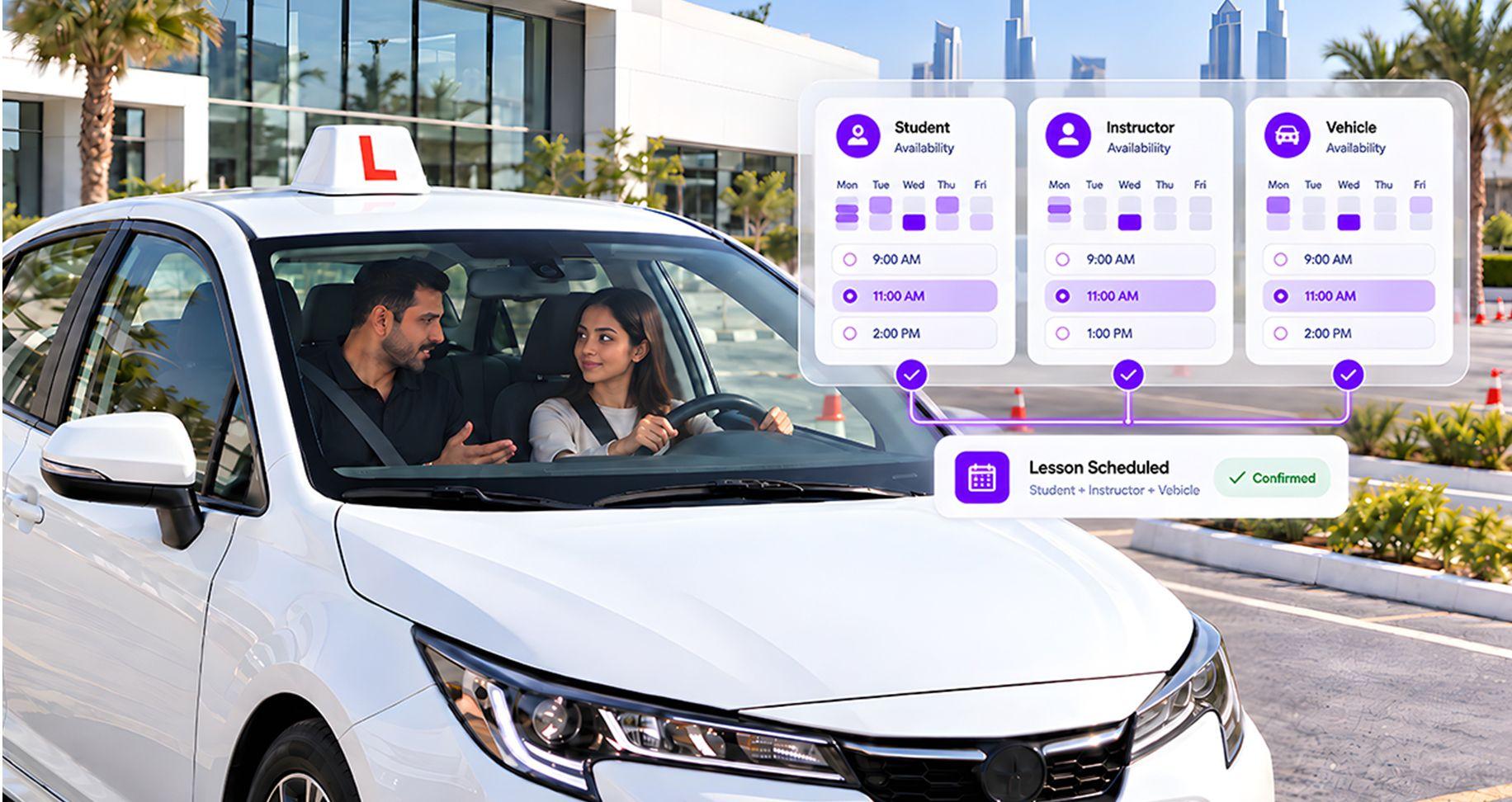
Booking a driving lesson looks simple from the student's side: pick a time and show up. Behind that booking, the school must line up three separate resources at the same time. The student must be free, a suitable instructor must be available, and a vehicle that fits the lesson must be on hand. If any one of them is missing or mismatched, the lesson cannot run.
This is the three-way scheduling challenge, and it is one of the main reasons driving schools move away from spreadsheets, phone calls, and messaging groups. Driving school software, especially scheduling software, is built to check all three resources together, apply the rules that make a slot valid, and keep the schedule accurate as things change. This article explains how that coordination works and where it improves day-to-day operations.
Why Scheduling a Driving Lesson Requires More Than Finding an Open Time Slot
A typical appointment involves one person and one calendar. A driving lesson involves at least three calendars that must overlap, plus a set of conditions that decide whether the overlap is usable.
The student has their own availability, shaped by work, school, and travel. The instructor works within shifts, breaks, leave days, and a limit on how many lessons they can teach in a day. The vehicle has its own constraints: it may be shared between instructors, it needs servicing and inspection, and it may be unavailable for a day or more at short notice.
Even when all three are free at the same time, the slot may still not be valid. The lesson may need a certain duration, a buffer between sessions for handover or fuel, or travel time to reach a pickup location. The instructor may not be qualified for the vehicle category. The student may need an automatic car rather than a manual one, or a particular type of lesson for their stage of training.
Managing all of this by hand works at a very small scale. As a school adds students, instructors, and vehicles, the number of combinations grows quickly, and the result is double bookings, idle gaps, last-minute cancellations, and a lot of time spent on phone calls instead of teaching.
How Driving Schools Coordinate Student, Instructor, and Vehicle Availability
Without software, coordination usually depends on one or two administrators who hold the schedule in their heads or across several files. They confirm the student's preferred time, check the instructor's diary, check which vehicle is free, and then confirm back. Each step involves a wait, and the information goes out of date as soon as someone else makes a change.
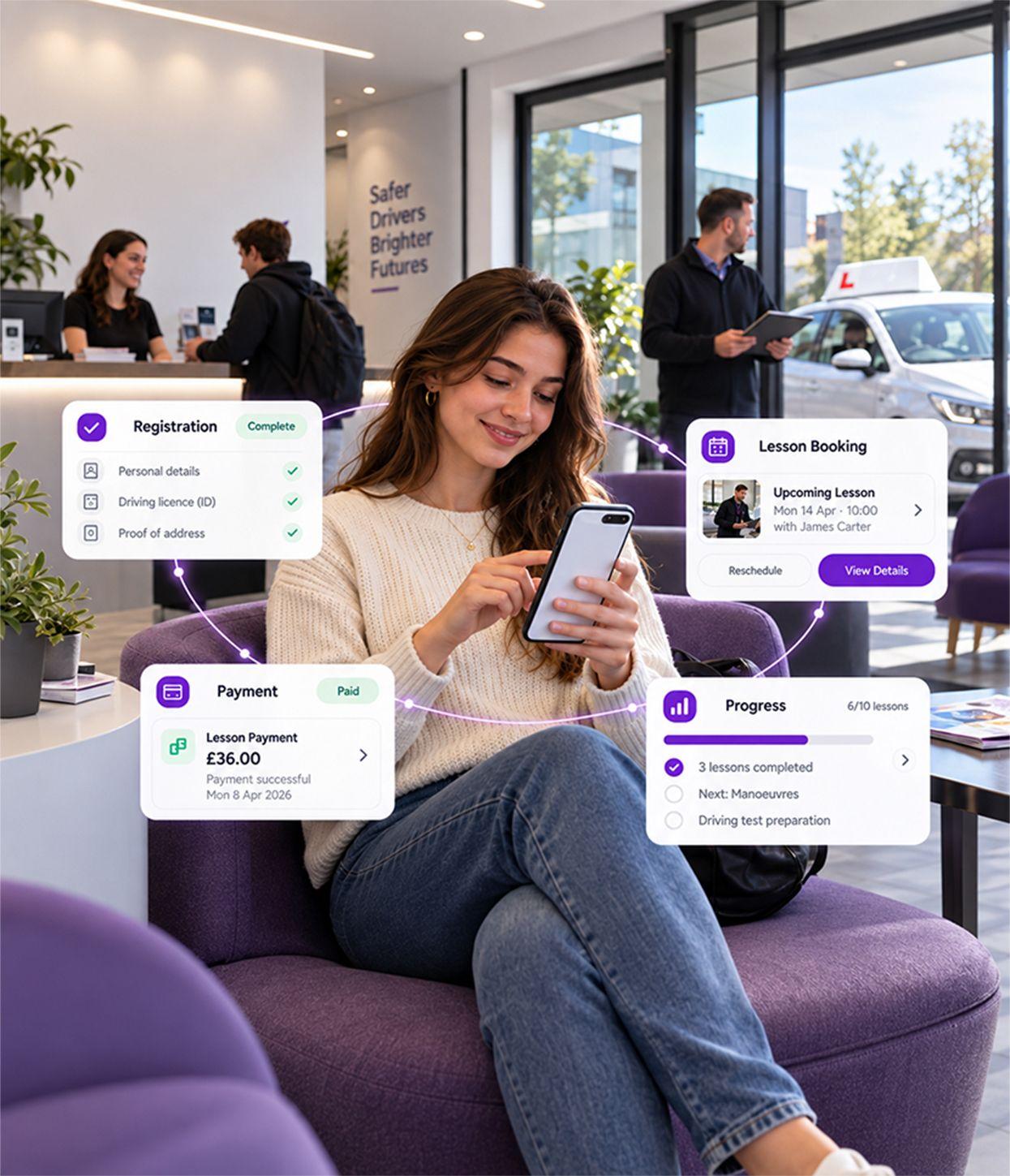
Driving school software replaces this with a shared source of truth. Each student, instructor, and vehicle has a profile with its own availability rules. Instructors have working hours, days off, and breaks. Vehicles have assignments, service dates, and status. Students have preferences, lesson balances, and progress records. All of this sits in a central calendar that administrators, instructors, and students can see in the form that suits them.
When a booking is requested, the system does not simply look for an open space on one calendar. It looks for the overlap between all three and checks that overlap against the school's rules. This is what separates a driving school booking software from a basic appointment tool: it understands that a lesson is a combination of resources rather than a single entry in a diary.
How Driving School Software Uses Real-Time Availability to Build Valid Lesson Slots
The core of three-way scheduling is real-time availability. The software continuously holds the current state of every instructor, vehicle, and student, and uses it to generate only the slots that can actually run.
The process follows a clear sequence. A student, or an administrator on their behalf, requests a lesson. The system identifies the instructors and vehicles that match the lesson type, then calculates the windows when a matching instructor, a matching vehicle, and the student are all free. It applies the school's rules, such as lesson length, buffers between sessions, and travel time, and removes any window that breaks them. The student sees only the slots that remain.
When a slot is booked, the system reserves the instructor, the vehicle, and the time together, so no other booking can claim any of them. This is what prevents double booking. Because the schedule updates instantly, a slot taken through the student app disappears from the administrator's dashboard and from every other channel at the same moment.
This is also what makes driving lesson scheduling software practical for self-service. Students can book without calling the office, administrators spend less time confirming and re-confirming, and the schedule reflects reality rather than the last time someone updated a file. For large schools, working from live availability is the difference between a schedule that can be trusted and one that must be checked constantly.
How Qualification, Vehicle Type, and Lesson Requirements Affect Scheduling
Availability alone does not make a slot valid. The resources also have to be compatible with the lesson.
Instructors hold different qualifications. One may be qualified to teach cars only, another motorcycles, and another heavy vehicles. Some may specialise in particular lesson types, such as test preparation or nervous beginners. Driving school software stores these attributes against each instructor so that a booking for a given category is only offered to those who can teach it.
Vehicles differ in the same way. Transmission type, vehicle category, and equipment such as dual controls all affect whether a vehicle suits a lesson. A student learning on a manual car needs a manual vehicle, and a lesson for a particular category needs a vehicle of that category. The software matches the vehicle to the lesson requirement rather than treating all vehicles as interchangeable.
Lesson requirements also change as the student progresses. A first lesson, a lesson on a specific manoeuvre, and a mock test session may have different durations, different instructors, or different vehicles. Students may also have preferences, such as a particular instructor or language, where the school supports them. Rules and requirements differ between jurisdictions and schools, so the software is configured to reflect how each school operates and what its local regulations require. Schools should confirm those local requirements themselves.
By building these rules into the scheduling logic, the software stops invalid bookings before they are made, which saves the school from last-minute swaps and disappointed students.
What Happens When an Instructor or Vehicle Becomes Unavailable
Even a well-built schedule is disrupted by events outside the school's control. An instructor falls ill, a vehicle breaks down, a car goes in for unplanned repair, or a student cancels at short notice. In a manual system, each of these starts a chain of phone calls, with the administrator working out which lessons are affected and who can cover them.
Driving school automation handles this differently. When an instructor or vehicle is marked unavailable, the software identifies every lesson that depends on that resource. It then looks for alternatives that keep the lesson valid: another qualified instructor, a substitute vehicle of the same type, or a different slot that suits the student. Administrators can review and approve the changes, or the system can apply preset rules, depending on how the school prefers to work.
Affected students are notified automatically, so they hear about the change from the system rather than finding out on the day. Schools can also prioritise rebooking, for example by giving students with an upcoming test first access to replacement slots. When a student cancels, the freed instructor and vehicle time is released straight back into availability, where it can be filled from a waiting list or offered to other students.
The result is that disruptions are absorbed quickly, with a clear record of what changed and why, rather than spreading through the schedule.
How Three-Way Scheduling Helps Improve Instructor and Vehicle Utilization
Instructors and vehicles are a driving school's most expensive resources, and every unused hour is lost capacity. Poor scheduling creates that waste through gaps between lessons, vehicles sitting idle while instructors wait for students, and uneven workloads where some instructors are overbooked and others are underused.
Because the software sees all three resources together, it can fill the schedule more efficiently. It can offer slots that sit next to existing lessons, which reduces idle gaps. It can balance lessons across instructors, and it can show which vehicles are being used heavily and which are not. Where vehicles are shared across shifts, it can make sure they move between instructors without clashes.
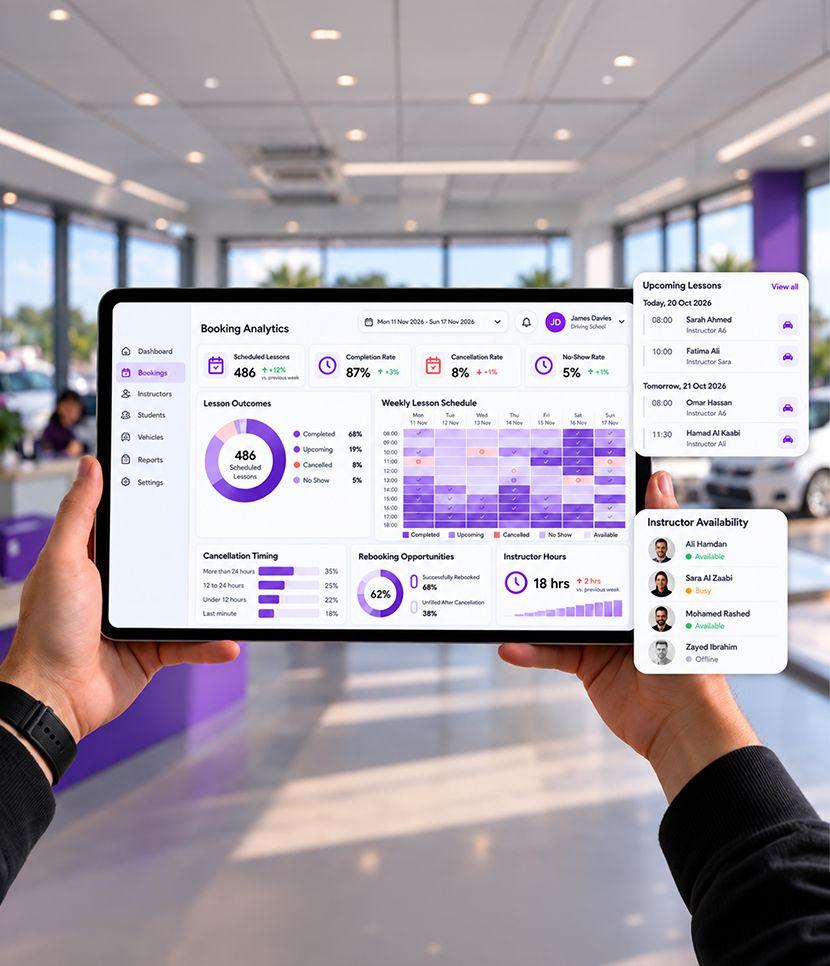
Reporting adds another layer. Utilization can be measured as booked hours against available hours for each instructor and each vehicle, which helps schools spot underused capacity, plan for peak periods, and make better decisions about adding instructors or vehicles. The benefit comes from visibility. Schools can see how resources are actually being used instead of estimating it, and then adjust working hours, vehicle allocation, and booking rules to match demand.
How Better Resource Coordination Improves Student Lesson Availability
Better coordination does not only help the school. It gives students more usable options and a smoother booking experience.
When the system works from live availability across all three resources, it can show every valid slot, including ones that a person checking manually might miss, such as a gap created by a late cancellation. Students find a suitable time faster and do not have to wait for the office to confirm. Slots released by cancellations can be offered quickly to others, so fewer hours go unused, and more students get the time they want.
Reliability also improves. Students are less likely to arrive for a lesson that cannot run, because the booking was validated against the instructor, vehicle, and requirements before it was confirmed. And when something does change, they are told promptly and offered an alternative. A steady lesson rhythm helps students progress consistently, which is something both students and schools value.
For schools, this means fewer lost bookings, less administrative effort, and a service that students find easier to use. For students, it means a clearer path from the first booking to the last lesson.
How Does Pedal Mobility Support Driving School Scheduling?
Pedal Mobility is driving school management software used by schools in the UAE and across APAC. It brings instructor booking, scheduling, and student progress together in one system, so schools can coordinate students, instructors, and vehicles from a single place rather than across separate files and messages.
For schools handling growing numbers of students, instructors, and vehicles, this approach reduces manual coordination and helps keep schedules accurate as conditions change.
Conclusion
Scheduling a driving lesson is a coordination problem involving three resources, each with its own availability, qualifications, and constraints. Driving school software handles it by treating the student, the instructor, and the vehicle as one linked booking, checking them against the school's rules in real time, and adjusting the schedule when circumstances change. The result is fewer scheduling errors, better use of instructors and vehicles, and more lesson options for students.
Driving schools that want to simplify scheduling and make better use of their instructors and vehicles can contact the Pedal Mobility team to see how the platform supports their operations.
FAQs
Q: What is three-way scheduling in a driving school?
A: Three-way scheduling is the process of matching a student, an instructor, and a vehicle for the same lesson at the same time. A lesson can only run when all three are available and compatible, so the schedule has to account for each resource and the rules that connect them.
Q: Can driving school software check student, instructor, and vehicle availability together?
A: Yes. Driving school software holds the availability of each resource in one system and calculates the windows where all three overlap. It then applies lesson rules such as duration and buffers, and shows only the slots that can actually run.
Q: Can a lesson be booked if an instructor is available but no suitable vehicle is free?
A: Not in a properly configured system. A slot is only offered when an instructor and a suitable vehicle are both free, so a lesson will not be confirmed if either is missing. The software can suggest another time or another matching vehicle instead.
Q: Can driving school software consider instructor qualifications when scheduling lessons?
A: Yes. Instructor qualifications, such as the vehicle categories they can teach and the lesson types they handle, can be stored against each profile. The software then offers a booking only to instructors who are suitable for that lesson.
Q: How does driving school software match vehicle type with lesson requirements?
A: Each vehicle is recorded with attributes such as category, transmission, and equipment. When a lesson is requested, the software compares its requirements with these attributes and only assigns vehicles that fit, so a manual lesson is never booked into an automatic car.
Q: Why is real-time resource availability important for large driving schools?
A: Large schools have many students, instructors, and vehicles changing status throughout the day. Real-time availability prevents double bookings, shows accurate slots, and lets the school respond quickly to cancellations or breakdowns, which is difficult to achieve with manually maintained schedules.
You might also be interested

Transforming global driver training and licensing with AI-powered driver training software by connecting students, instructors, driving centres, and regulators in a seamless ecosystem.
Empowering all Stakeholders with Pedal Mobilitys Solutions.
Driving the Future With Results That Matter
Empowering students worldwide with innovative driver training software solutions tailored for modern learning.
Maximizing efficiency by smartly assigning vehicles and instructors, driven by our centralized driving school system.
Going fully digital with a paperless, user-friendly onboarding system powered by modern driving software.
Engaging students, instructors, and training admins every day through a connected, seamless, and intuitive driver training platform.
Introducing the New Era of AI in Personal Mobility
Pedal transforms driver education by integrating AI and automation into every step. Our centralized driving training software connects students, instructors, and regulators in a seamless, data-driven ecosystem built for modern mobility.
Insights and Stories shaping Driver Education
From instructor management to vehicle assignment, we are driving the future with results that matter.
Our platform connects students, instructors, and training admins every day through a connected, seamless, and intuitive driver training platform.
Introducing the New Era of AI in Personal Mobility
Transforming global driver training and licensing with AI-powered driver training software by connecting students, instructors, driving centres, and regulators in a seamless ecosystem.
Empowering all Stakeholders with Pedal Mobilitys Solutions.
Driving the Future With Results That Matter
Empowering students worldwide with innovative driver training software solutions tailored for modern learning.
Maximizing efficiency by smartly assigning vehicles and instructors, driven by our centralized driving school system.
Going fully digital with a paperless, user-friendly onboarding system powered by modern driving software.
Engaging students, instructors, and training admins every day through a connected, seamless, and intuitive driver training platform.
Introducing the New Era of AI in Personal Mobility
Pedal transforms driver education by integrating AI and automation into every step. Our centralized driving training software connects students, instructors, and regulators in a seamless, data-driven ecosystem built for modern mobility.
Insights and Stories shaping Driver Education
Maximizing efficiency by smartly assigning vehicles and instructors, driven by our centralized driving school system.
Going fully digital with a paperless, user-friendly onboarding system powered by modern driving software.
Engaging students, instructors, and training admins every day through a connected, seamless, and intuitive driver training platform.
Introducing the New Era of AI in Personal Mobility
Pedal transforms driver education by integrating AI and automation into every step. Our centralized driving training software connects students, instructors, and regulators in a seamless, data-driven ecosystem built for modern mobility.
Insights and Stories shaping Driver Education
Maximizing efficiency by smartly assigning vehicles and instructors, driven by our centralized driving school system.
Going fully digital with a paperless, user-friendly onboarding system powered by modern driving software.
Engaging students, instructors, and training admins every day through a connected, seamless, and intuitive driver training platform.
Introducing the New Era of AI in Personal Mobility
Pedal transforms driver education by integrating AI and automation into every step. Our centralized driving training software connects students, instructors, and regulators in a seamless, data-driven ecosystem built for modern mobility.
Insights and Stories shaping Driver Education
Maximizing efficiency by smartly assigning vehicles and instructors, driven by our centralized driving school system.
Going fully digital with a paperless, user-friendly onboarding system powered by modern driving software.
Engaging students, instructors, and training admins every day through a connected, seamless, and intuitive driver training platform.
Introducing the New Era of AI in Personal Mobility
Pedal transforms driver education by integrating AI and automation into every step. Our centralized driving training software connects students, instructors, and regulators in a seamless, data-driven ecosystem built for modern mobility.
Insights and Stories shaping Driver Education
Maximizing efficiency by smartly assigning vehicles and instructors, driven by our centralized driving school system.
Going fully digital with a paperless, user-friendly onboarding system powered by modern driving software.
Engaging students, instructors, and training admins every day through a connected, seamless, and intuitive driver training platform.
Introducing the New Era of AI in Personal Mobility
Pedal transforms driver education by integrating AI and automation into every step. Our centralized driving training software connects students, instructors, and regulators in a seamless, data-driven ecosystem built for modern mobility.
Insights and Stories shaping Driver Education
From instructor management to vehicle assignment, we are driving the future with results that matter.
Our platform connects students, instructors, and training admins every day through a connected, seamless, and intuitive driver training platform.
Introducing the New Era of AI in Personal Mobility Transforming global driver training and licensing with AI-powered driver training software by connecting students, instructors, driving centres, and regulators in a seamless ecosystem.
Empowering all Stakeholders with Pedal Mobilitys Solutions.
Driving the Future With Results That Matter
Empowering students worldwide with innovative driver training software solutions tailored for modern learning.
Maximizing efficiency by smartly assigning vehicles and instructors, driven by our centralized driving school system.
Going fully digital with a paperless, user-friendly onboarding system powered by modern driving software.
Engaging students, instructors, and training admins every day through a connected, seamless, and intuitive driver training platform.
Introducing the New Era of AI in Personal Mobility
Pedal transforms driver education by integrating AI and automation into every step. Our centralized driving training software connects students, instructors, and regulators in a seamless, data-driven ecosystem built for modern mobility.
Insights and Stories shaping Driver Education
Maximizing efficiency by smartly assigning vehicles and instructors, driven by our centralized driving school system.
Going fully digital with a paperless, user-friendly onboarding system powered by modern driving software.
Engaging students, instructors, and training admins every day through a connected, seamless, and intuitive driver training platform.
Introducing the New Era of AI in Personal Mobility
Pedal transforms driver education by integrating AI and automation into every step. Our centralized driving training software connects students, instructors, and regulators in a seamless, data-driven ecosystem built for modern mobility.
Insights and Stories shaping Driver Education
Maximizing efficiency by smartly assigning vehicles and instructors, driven by our centralized driving school system.
Going fully digital with a paperless, user-friendly onboarding system powered by modern driving software.
Engaging students, instructors, and training admins every day through a connected, seamless, and intuitive driver training platform.
Introducing the New Era of AI in Personal Mobility
Pedal transforms driver education by integrating AI and automation into every step. Our centralized driving training software connects students, instructors, and regulators in a seamless, data-driven ecosystem built for modern mobility.
Insights and Stories shaping Driver Education
Maximizing efficiency by smartly assigning vehicles and instructors, driven by our centralized driving school system.
Going fully digital with a paperless, user-friendly onboarding system powered by modern driving software.
Engaging students, instructors, and training admins every day through a connected, seamless, and intuitive driver training platform.
Introducing the New Era of AI in Personal Mobility
Pedal transforms driver education by integrating AI and automation into every step. Our centralized driving training software connects students, instructors, and regulators in a seamless, data-driven ecosystem built for modern mobility.
Insights and Stories shaping Driver Education
Maximizing efficiency by smartly assigning vehicles and instructors, driven by our centralized driving school system.
Going fully digital with a paperless, user-friendly onboarding system powered by modern driving software.
Engaging students, instructors, and training admins every day through a connected, seamless, and intuitive driver training platform.
Introducing the New Era of AI in Personal Mobility
Pedal transforms driver education by integrating AI and automation into every step. Our centralized driving training software connects students, instructors, and regulators in a seamless, data-driven ecosystem built for modern mobility.
Insights and Stories shaping Driver Education
From instructor management to vehicle assignment, we are driving the future with results that matter.
Our platform connects students, instructors, and training admins every day through a connected, seamless, and intuitive driver training platform.
Introducing the New Era of AI in Personal Mobility
Transforming global driver training and licensing with AI-powered driver training software by connecting students, instructors, driving centres, and regulators in a seamless ecosystem.
Empowering all Stakeholders with Pedal Mobilitys Solutions.
Driving the Future With Results That Matter
Empowering students worldwide with innovative driver training software solutions tailored for modern learning.
Maximizing efficiency by smartly assigning vehicles and instructors, driven by our centralized driving school system.
Going fully digital with a paperless, user-friendly onboarding system powered by modern driving software.
Engaging students, instructors, and training admins every day through a connected, seamless, and intuitive driver training platform.
Introducing the New Era of AI in Personal Mobility
Pedal transforms driver education by integrating AI and automation into every step. Our centralized driving training software connects students, instructors, and regulators in a seamless, data-driven ecosystem built for modern mobility.
Insights and Stories shaping Driver Education
Maximizing efficiency by smartly assigning vehicles and instructors, driven by our centralized driving school system.
Going fully digital with a paperless, user-friendly onboarding system powered by modern driving software.
Engaging students, instructors, and training admins every day through a connected, seamless, and intuitive driver training platform.
Introducing the New Era of AI in Personal Mobility
Pedal transforms driver education by integrating AI and automation into every step. Our centralized driving training software connects students, instructors, and regulators in a seamless, data-driven ecosystem built for modern mobility.
Insights and Stories shaping Driver Education
Maximizing efficiency by smartly assigning vehicles and instructors, driven by our centralized driving school system.
Going fully digital with a paperless, user-friendly onboarding system powered by modern driving software.
Engaging students, instructors, and training admins every day through a connected, seamless, and intuitive driver training platform.
Introducing the New Era of AI in Personal Mobility
Pedal transforms driver education by integrating AI and automation into every step. Our centralized driving training software connects students, instructors, and regulators in a seamless, data-driven ecosystem built for modern mobility.
Insights and Stories shaping Driver Education
Maximizing efficiency by smartly assigning vehicles and instructors, driven by our centralized driving school system.
Going fully digital with a paperless, user-friendly onboarding system powered by modern driving software.
Engaging students, instructors, and training admins every day through a connected, seamless, and intuitive driver training platform.
Introducing the New Era of AI in Personal Mobility
Pedal transforms driver education by integrating AI and automation into every step. Our centralized driving training software connects students, instructors, and regulators in a seamless, data-driven ecosystem built for modern mobility.
Insights and Stories shaping Driver Education
Maximizing efficiency by smartly assigning vehicles and instructors, driven by our centralized driving school system.
Going fully digital with a paperless, user-friendly onboarding system powered by modern driving software.
Engaging students, instructors, and training admins every day through a connected, seamless, and intuitive driver training platform.
Introducing the New Era of AI in Personal Mobility
Pedal transforms driver education by integrating AI and automation into every step. Our centralized driving training software connects students, instructors, and regulators in a seamless, data-driven ecosystem built for modern mobility.
Insights and Stories shaping Driver Education
From instructor management to vehicle assignment, we are driving the future with results that matter.
Our platform connects students, instructors, and training admins every day through a connected, seamless, and intuitive driver training platform.
Introducing the New Era of AI in Personal Mobility
Transforming global driver training and licensing with AI-powered driver training software by connecting students, instructors, driving centres, and regulators in a seamless ecosystem.
Empowering all Stakeholders with Pedal Mobilitys Solutions.
Driving the Future With Results That Matter
Empowering students worldwide with innovative driver training software solutions tailored for modern learning.
Maximizing efficiency by smartly assigning vehicles and instructors, driven by our centralized driving school system.
Going fully digital with a paperless, user-friendly onboarding system powered by modern driving software.
Engaging students, instructors, and training admins every day through a connected, seamless, and intuitive driver training platform.
Introducing the New Era of AI in Personal Mobility
Pedal transforms driver education by integrating AI and automation into every step. Our centralized driving training software connects students, instructors, and regulators in a seamless, data-driven ecosystem built for modern mobility.
Insights and Stories shaping Driver Education
Maximizing efficiency by smartly assigning vehicles and instructors, driven by our centralized driving school system.
Going fully digital with a paperless, user-friendly onboarding system powered by modern driving software.
Engaging students, instructors, and training admins every day through a connected, seamless, and intuitive driver training platform.
Introducing the New Era of AI in Personal Mobility
Pedal transforms driver education by integrating AI and automation into every step. Our centralized driving training software connects students, instructors, and regulators in a seamless, data-driven ecosystem built for modern mobility.
Insights and Stories shaping Driver Education
Maximizing efficiency by smartly assigning vehicles and instructors, driven by our centralized driving school system.
Going fully digital with a paperless, user-friendly onboarding system powered by modern driving software.
Engaging students, instructors, and training admins every day through a connected, seamless, and intuitive driver training platform.
Introducing the New Era of AI in Personal Mobility
Pedal transforms driver education by integrating AI and automation into every step. Our centralized driving training software connects students, instructors, and regulators in a seamless, data-driven ecosystem built for modern mobility.
Insights and Stories shaping Driver Education
Maximizing efficiency by smartly assigning vehicles and instructors, driven by our centralized driving school system.
Going fully digital with a paperless, user-friendly onboarding system powered by modern driving software.
Engaging students, instructors, and training admins every day through a connected, seamless, and intuitive driver training platform.
Introducing the New Era of AI in Personal Mobility
Pedal transforms driver education by integrating AI and automation into every step. Our centralized driving training software connects students, instructors, and regulators in a seamless, data-driven ecosystem built for modern mobility.
Insights and Stories shaping Driver Education
Maximizing efficiency by smartly assigning vehicles and instructors, driven by our centralized driving school system.
Going fully digital with a paperless, user-friendly onboarding system powered by modern driving software.
Engaging students, instructors, and training admins every day through a connected, seamless, and intuitive driver training platform.
Introducing the New Era of AI in Personal Mobility
Pedal transforms driver education by integrating AI and automation into every step. Our centralized driving training software connects students, instructors, and regulators in a seamless, data-driven ecosystem built for modern mobility.
Insights and Stories shaping Driver Education
From instructor management to vehicle assignment, we are driving the future with results that matter.
Our platform connects students, instructors, and training admins every day through a connected, seamless, and intuitive driver training platform.
Introducing the New Era of AI in Personal Mobility Transforming global driver training and licensing with AI-powered driver training software by connecting students, instructors, driving centres, and regulators in a seamless ecosystem.
Empowering all Stakeholders with Pedal Mobilitys Solutions.
Driving the Future With Results That Matter
Empowering students worldwide with innovative driver training software solutions tailored for modern learning.
Maximizing efficiency by smartly assigning vehicles and instructors, driven by our centralized driving school system.
Going fully digital with a paperless, user-friendly onboarding system powered by modern driving software.
Engaging students, instructors, and training admins every day through a connected, seamless, and intuitive driver training platform.
Introducing the New Era of AI in Personal Mobility
Pedal transforms driver education by integrating AI and automation into every step. Our centralized driving training software connects students, instructors, and regulators in a seamless, data-driven ecosystem built for modern mobility.
Insights and Stories shaping Driver Education
Maximizing efficiency by smartly assigning vehicles and instructors, driven by our centralized driving school system.
Going fully digital with a paperless, user-friendly onboarding system powered by modern driving software.
Engaging students, instructors, and training admins every day through a connected, seamless, and intuitive driver training platform.
Introducing the New Era of AI in Personal Mobility
Pedal transforms driver education by integrating AI and automation into every step. Our centralized driving training software connects students, instructors, and regulators in a seamless, data-driven ecosystem built for modern mobility.
Insights and Stories shaping Driver Education
Maximizing efficiency by smartly assigning vehicles and instructors, driven by our centralized driving school system.
Going fully digital with a paperless, user-friendly onboarding system powered by modern driving software.
Engaging students, instructors, and training admins every day through a connected, seamless, and intuitive driver training platform.
Introducing the New Era of AI in Personal Mobility
Pedal transforms driver education by integrating AI and automation into every step. Our centralized driving training software connects students, instructors, and regulators in a seamless, data-driven ecosystem built for modern mobility.
Insights and Stories shaping Driver Education
Maximizing efficiency by smartly assigning vehicles and instructors, driven by our centralized driving school system.
Going fully digital with a paperless, user-friendly onboarding system powered by modern driving software.
Engaging students, instructors, and training admins every day through a connected, seamless, and intuitive driver training platform.
Introducing the New Era of AI in Personal Mobility
Pedal transforms driver education by integrating AI and automation into every step. Our centralized driving training software connects students, instructors, and regulators in a seamless, data-driven ecosystem built for modern mobility.
Insights and Stories shaping Driver Education
Maximizing efficiency by smartly assigning vehicles and instructors, driven by our centralized driving school system.
Going fully digital with a paperless, user-friendly onboarding system powered by modern driving software.
Engaging students, instructors, and training admins every day through a connected, seamless, and intuitive driver training platform.
Introducing the New Era of AI in Personal Mobility
Pedal transforms driver education by integrating AI and automation into every step. Our centralized driving training software connects students, instructors, and regulators in a seamless, data-driven ecosystem built for modern mobility.
Insights and Stories shaping Driver Education
From instructor management to vehicle assignment, we are driving the future with results that matter.
Our platform connects students, instructors, and training admins every day through a connected, seamless, and intuitive driver training platform.
Introducing the New Era of AI in Personal Mobility
Transforming global driver training and licensing with AI-powered driver training software by connecting students, instructors, driving centres, and regulators in a seamless ecosystem.
Empowering all Stakeholders with Pedal Mobilitys Solutions.
Driving the Future With Results That Matter
Empowering students worldwide with innovative driver training software solutions tailored for modern learning.
Maximizing efficiency by smartly assigning vehicles and instructors, driven by our centralized driving school system.
Going fully digital with a paperless, user-friendly onboarding system powered by modern driving software.
Engaging students, instructors, and training admins every day through a connected, seamless, and intuitive driver training platform.
Introducing the New Era of AI in Personal Mobility
Pedal transforms driver education by integrating AI and automation into every step. Our centralized driving training software connects students, instructors, and regulators in a seamless, data-driven ecosystem built for modern mobility.
Insights and Stories shaping Driver Education
Maximizing efficiency by smartly assigning vehicles and instructors, driven by our centralized driving school system.
Going fully digital with a paperless, user-friendly onboarding system powered by modern driving software.
Engaging students, instructors, and training admins every day through a connected, seamless, and intuitive driver training platform.
Introducing the New Era of AI in Personal Mobility
Pedal transforms driver education by integrating AI and automation into every step. Our centralized driving training software connects students, instructors, and regulators in a seamless, data-driven ecosystem built for modern mobility.
Insights and Stories shaping Driver Education
Maximizing efficiency by smartly assigning vehicles and instructors, driven by our centralized driving school system.
Going fully digital with a paperless, user-friendly onboarding system powered by modern driving software.
Engaging students, instructors, and training admins every day through a connected, seamless, and intuitive driver training platform.
Introducing the New Era of AI in Personal Mobility
Pedal transforms driver education by integrating AI and automation into every step. Our centralized driving training software connects students, instructors, and regulators in a seamless, data-driven ecosystem built for modern mobility.
Insights and Stories shaping Driver Education
Maximizing efficiency by smartly assigning vehicles and instructors, driven by our centralized driving school system.
Going fully digital with a paperless, user-friendly onboarding system powered by modern driving software.
Engaging students, instructors, and training admins every day through a connected, seamless, and intuitive driver training platform.
Introducing the New Era of AI in Personal Mobility
Pedal transforms driver education by integrating AI and automation into every step. Our centralized driving training software connects students, instructors, and regulators in a seamless, data-driven ecosystem built for modern mobility.
Insights and Stories shaping Driver Education
Maximizing efficiency by smartly assigning vehicles and instructors, driven by our centralized driving school system.
Going fully digital with a paperless, user-friendly onboarding system powered by modern driving software.
Engaging students, instructors, and training admins every day through a connected, seamless, and intuitive driver training platform.
Introducing the New Era of AI in Personal Mobility
Pedal transforms driver education by integrating AI and automation into every step. Our centralized driving training software connects students, instructors, and regulators in a seamless, data-driven ecosystem built for modern mobility.
Insights and Stories shaping Driver Education
From instructor management to vehicle assignment, we are driving the future with results that matter.
Our platform connects students, instructors, and training admins every day through a connected, seamless, and intuitive driver training platform.
Introducing the New Era of AI in Personal Mobility
Transforming global driver training and licensing with AI-powered driver training software by connecting students, instructors, driving centres, and regulators in a seamless ecosystem.
Empowering all Stakeholders with Pedal Mobilitys Solutions.
Driving the Future With Results That Matter
Empowering students worldwide with innovative driver training software solutions tailored for modern learning.
Maximizing efficiency by smartly assigning vehicles and instructors, driven by our centralized driving school system.
Going fully digital with a paperless, user-friendly onboarding system powered by modern driving software.
Engaging students, instructors, and training admins every day through a connected, seamless, and intuitive driver training platform.
Introducing the New Era of AI in Personal Mobility
Pedal transforms driver education by integrating AI and automation into every step. Our centralized driving training software connects students, instructors, and regulators in a seamless, data-driven ecosystem built for modern mobility.
Insights and Stories shaping Driver Education
Maximizing efficiency by smartly assigning vehicles and instructors, driven by our centralized driving school system.
Going fully digital with a paperless, user-friendly onboarding system powered by modern driving software.
Engaging students, instructors, and training admins every day through a connected, seamless, and intuitive driver training platform.
Introducing the New Era of AI in Personal Mobility
Pedal transforms driver education by integrating AI and automation into every step. Our centralized driving training software connects students, instructors, and regulators in a seamless, data-driven ecosystem built for modern mobility.
Insights and Stories shaping Driver Education
Maximizing efficiency by smartly assigning vehicles and instructors, driven by our centralized driving school system.
Going fully digital with a paperless, user-friendly onboarding system powered by modern driving software.
Engaging students, instructors, and training admins every day through a connected, seamless, and intuitive driver training platform.
Introducing the New Era of AI in Personal Mobility
Pedal transforms driver education by integrating AI and automation into every step. Our centralized driving training software connects students, instructors, and regulators in a seamless, data-driven ecosystem built for modern mobility.
Insights and Stories shaping Driver Education
Maximizing efficiency by smartly assigning vehicles and instructors, driven by our centralized driving school system.
Going fully digital with a paperless, user-friendly onboarding system powered by modern driving software.
Engaging students, instructors, and training admins every day through a connected, seamless, and intuitive driver training platform.
Introducing the New Era of AI in Personal Mobility
Pedal transforms driver education by integrating AI and automation into every step. Our centralized driving training software connects students, instructors, and regulators in a seamless, data-driven ecosystem built for modern mobility.
Insights and Stories shaping Driver Education
Maximizing efficiency by smartly assigning vehicles and instructors, driven by our centralized driving school system.
Going fully digital with a paperless, user-friendly onboarding system powered by modern driving software.
Engaging students, instructors, and training admins every day through a connected, seamless, and intuitive driver training platform.
Introducing the New Era of AI in Personal Mobility
Pedal transforms driver education by integrating AI and automation into every step. Our centralized driving training software connects students, instructors, and regulators in a seamless, data-driven ecosystem built for modern mobility.
Insights and Stories shaping Driver Education
From instructor management to vehicle assignment, we are driving the future with results that matter.
Our platform connects students, instructors, and training admins every day through a connected, seamless, and intuitive driver training platform.
Introducing the New Era of AI in Personal Mobility Transforming global driver training and licensing with AI-powered driver training software by connecting students, instructors, driving centres, and regulators in a seamless ecosystem.
Empowering all Stakeholders with Pedal Mobilitys Solutions.
Driving the Future With Results That Matter
Empowering students worldwide with innovative driver training software solutions tailored for modern learning.
Maximizing efficiency by smartly assigning vehicles and instructors, driven by our centralized driving school system.
Going fully digital with a paperless, user-friendly onboarding system powered by modern driving software.
Engaging students, instructors, and training admins every day through a connected, seamless, and intuitive driver training platform.
Introducing the New Era of AI in Personal Mobility
Pedal transforms driver education by integrating AI and automation into every step. Our centralized driving training software connects students, instructors, and regulators in a seamless, data-driven ecosystem built for modern mobility.
Insights and Stories shaping Driver Education
Maximizing efficiency by smartly assigning vehicles and instructors, driven by our centralized driving school system.
Going fully digital with a paperless, user-friendly onboarding system powered by modern driving software.
Engaging students, instructors, and training admins every day through a connected, seamless, and intuitive driver training platform.
Introducing the New Era of AI in Personal Mobility
Pedal transforms driver education by integrating AI and automation into every step. Our centralized driving training software connects students, instructors, and regulators in a seamless, data-driven ecosystem built for modern mobility.
Insights and Stories shaping Driver Education
Maximizing efficiency by smartly assigning vehicles and instructors, driven by our centralized driving school system.
Going fully digital with a paperless, user-friendly onboarding system powered by modern driving software.
Engaging students, instructors, and training admins every day through a connected, seamless, and intuitive driver training platform.
Introducing the New Era of AI in Personal Mobility
Pedal transforms driver education by integrating AI and automation into every step. Our centralized driving training software connects students, instructors, and regulators in a seamless, data-driven ecosystem built for modern mobility.
Insights and Stories shaping Driver Education
Maximizing efficiency by smartly assigning vehicles and instructors, driven by our centralized driving school system.
Going fully digital with a paperless, user-friendly onboarding system powered by modern driving software.
Engaging students, instructors, and training admins every day through a connected, seamless, and intuitive driver training platform.
Introducing the New Era of AI in Personal Mobility
Pedal transforms driver education by integrating AI and automation into every step. Our centralized driving training software connects students, instructors, and regulators in a seamless, data-driven ecosystem built for modern mobility.
Insights and Stories shaping Driver Education
Maximizing efficiency by smartly assigning vehicles and instructors, driven by our centralized driving school system.
Going fully digital with a paperless, user-friendly onboarding system powered by modern driving software.
Engaging students, instructors, and training admins every day through a connected, seamless, and intuitive driver training platform.
Introducing the New Era of AI in Personal Mobility
Pedal transforms driver education by integrating AI and automation into every step. Our centralized driving training software connects students, instructors, and regulators in a seamless, data-driven ecosystem built for modern mobility.
Insights and Stories shaping Driver Education
From instructor management to vehicle assignment, we are driving the future with results that matter.
Our platform connects students, instructors, and training admins every day through a connected, seamless, and intuitive driver training platform.
Introducing the New Era of AI in Personal Mobility